• Skip to primary navigation
  • Skip to main content
  • Skip to primary sidebar

TechEngage®

Connecting mankind with technology

  • News
  • Reviews
  • Cryptocurrency
  • How-to
  • Roundups
  • Science
    • Energy
    • Environment
    • Health
    • Space
  • Apps
  • More
    • Opinion
    • Noteworthy
    • Culture
    • Events
    • Deals
    • Startups
      • Startup Submissions
  • Videos
  • Tools

Facebook launches Messenger for Windows and Mac

Muhammad Abdullah Muhammad Abdullah Follow Muhammad Abdullah on Twitter Updated: April 3, 2021

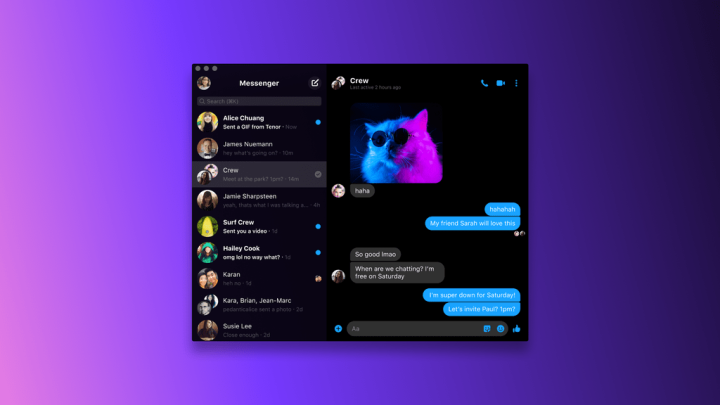
Messenger app on macOS with Dark Mode enabled
Facebook Messenger macOS / via Fb Newsroom
Shares35FacebookTweetPinLinkedInPrintEmail

After WhatsApp and Instagram apps for desktop, Facebook Messenger finally arrives on Windows and Mac. The new desktop app of Messenger debuts on Windows Store and Mac App Store and is now available for video chats and messages with your friends and family. The video chatting can also be used as a useful work from home app as a replacement to Zoom, Skype, and FaceTime.

video chatting on messenger for desktop
Facebook Messenger Video Calling for Desktop / via Facebook Newsroom

The desktop app has features like theme selection, notification support, account settings, change active status, message requests, and more. You can enable or disable Active Status on the desktop version of Messenger and can also change Appearance with the option to select from Grey, Dark, Light, and High Contrast. Messenger mimics your default system settings for light or dark mode; however, if you want to enable Grey mode, you can select Grey from theme settings.

In the notifications settings, you can find DND mode, Show previews, and Notification Sounds options. The chats support emoji reactions and threaded replies, just like the web version. To reply to a particular message from chat, you have to double click.

You can download Facebook Messenger for Mac and Windows.

This post was originally published on April 3, 2020 and was updated on April 3, 2021.

Filed Under: Social Networks, Apps, Software Tagged With: Desktop Software, Facebook, Facebook Messenger, macOS, Microsoft Windows

Related Stories

  • New File Explorer icons are coming to Windows 10

    New File Explorer icons are coming to Windows 10

  • Ad Pods are up next with YouTube

    Ad Pods are up next with YouTube

  • Apple brings password manager to iCloud for Windows in the latest update

    Apple brings password manager to iCloud for Windows in the latest update

Shares35FacebookTweetPinLinkedInPrintEmail

About Muhammad Abdullah

Abdullah is a computer scientist turned tech writer and certified Growth Hacker.

Reader Interactions

Share Your Thoughts Cancel reply

Please read our comment policy before submitting your comment. Your email address will not be used or published anywhere. You will only receive comment notifications if you opt to subscribe below.

Primary Sidebar

Become a contributor

We are accepting contributor applications. All applications will be decided in 3 days after applying. To learn more visit the contributors page.
TextSheet Alternative

6 Top Alternatives to Textsheet for 2025

Muhammad Zeshan Sarwar October 5, 2024

battery draining apps

Top 10 battery draining apps to avoid 2025

Muhammad Abdullah October 5, 2024

Recent Stories

  • 6 Top Alternatives to Textsheet for 2025
  • Top 10 battery draining apps to avoid 2025
  • The Benefits of Having a Small Air Compressor for Flat Tires
  • 4 Best Free VPNs for 2025
  • 9 Best Calendar Apps in 2025

Discover

  • About us
  • Newsroom
  • Staff
  • Advertise
  • Send us a tip
  • Startup Submission Questionnaire
  • Brand Kit
  • Contact us

© 2025 TechEngage®. All Rights Reserved. TechEngage® is a project of TechAbout LLC.

TechEngage® is a registered trademark in the United States under Trademark Number 6823709 and in the United Kingdom under Trademark Number UK00003417167. It is also ISSN protected under ISSN 2690-3776 and has OCLC Number 1139335774.

  • Terms & Conditions
  • Privacy Policy