• Skip to primary navigation
  • Skip to main content
  • Skip to primary sidebar

TechEngage®

Connecting mankind with technology

  • News
  • Reviews
  • Cryptocurrency
  • How-to
  • Roundups
  • Science
    • Energy
    • Environment
    • Health
    • Space
  • Apps
  • More
    • Opinion
    • Noteworthy
    • Culture
    • Events
    • Deals
    • Startups
      • Startup Submissions
  • Videos
  • Tools

How to rearrange your apps in iOS 13

Nouman S Ghumman Nouman S Ghumman Follow Nouman S Ghumman on Twitter August 31, 2020

iOS 13 review
Share1FacebookTweetPinLinkedInPrintEmail

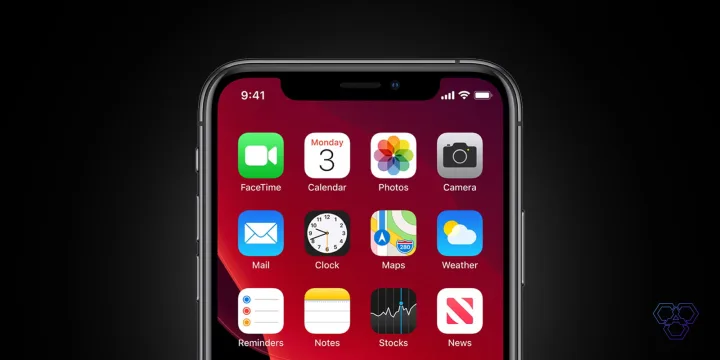
iOS 13 comes with a lot of new features that are useful for the users and provides them with a new enhanced user experience. With iOS 13, there a lot of things that users need to learn and become aware of. Like, the way to arrange the apps in iOS 13 is no longer the same.

In the iOS version 12 or earlier, when you tap and hold on the application icon to delete or move it, all the apps in the phone starts to vibrate. The new iOS 13 update gives a completely new feature when you long-press the app with the intention to move or delete them. It pops up a menu for the app, just like it was in 3D-touch enabled iPhones.

Also read: How to Update Apps in iOS 13

When you long-press the apps in iOS 13, a contextual menu opens up on the screen. The menu varies according to every app, but the apps don’t vibrate as they used to in previous versions.

Method 1:

To move the apps and rearrange, tap and hold longer than usual with your finger on an app and try to drag it, the other apps will vibrate. You can drag your finger across the screen to rearrange the apps on your phone.

Method 2:

You can also long-press the app while its pop-up menu appears; you can also drag the app down and off it from your finger, and the app will start to jiggle or vibrate.

Method 3:

Another method is to tap and hold the app until the menu appears and select ‘Edit Home Screen.’ The apps will vibrate, and you can rearrange them accordingly.

This is pretty much about the different methods by which you can rearrange your app. Do not worry! It will not take you long enough to get familiar with the iOS 13 version. The new updates in iOS 13 are introduced to improve the experience of people while using Apple devices.

You can also follow our Essential iOS guide to know more about iOS 13.
Filed Under: OS Tagged With: Apple, Apple iOS, iOS, iOS 13, iOSGuide

Related Stories

  • The Ultimate Guide to Save and Improve Battery Life on Android

    The Ultimate Guide to Save and Improve Battery Life on Android

  • A Preview of The iPhone 7

    A Preview of The iPhone 7

  • What we know about Apple’s plans to rival Google’s search engine

    What we know about Apple’s plans to rival Google’s search engine

Share1FacebookTweetPinLinkedInPrintEmail

About Nouman S Ghumman

The writer holds an LLM degree in International Commercial Law from the City University of London. He is a Managing Partner at SG Advocates & Legal Consultants. He is also the Vice President and Associate General Counsel at TECHENGAGE. He can be reached at nouman@sgadvocates.com

Reader Interactions

Share Your Thoughts Cancel reply

Please read our comment policy before submitting your comment. Your email address will not be used or published anywhere. You will only receive comment notifications if you opt to subscribe below.

Primary Sidebar

Become a contributor

We are accepting contributor applications. All applications will be decided in 3 days after applying. To learn more visit the contributors page.
TextSheet Alternative

6 Top Alternatives to Textsheet for 2025

Muhammad Zeshan Sarwar October 5, 2024

battery draining apps

Top 10 battery draining apps to avoid 2025

Muhammad Abdullah October 5, 2024

Recent Stories

  • 6 Top Alternatives to Textsheet for 2025
  • Top 10 battery draining apps to avoid 2025
  • The Benefits of Having a Small Air Compressor for Flat Tires
  • 4 Best Free VPNs for 2025
  • 9 Best Calendar Apps in 2025

Discover

  • About us
  • Newsroom
  • Staff
  • Advertise
  • Send us a tip
  • Startup Submission Questionnaire
  • Brand Kit
  • Contact us

© 2025 TechEngage®. All Rights Reserved. TechEngage® is a project of TechAbout LLC.

TechEngage® is a registered trademark in the United States under Trademark Number 6823709 and in the United Kingdom under Trademark Number UK00003417167. It is also ISSN protected under ISSN 2690-3776 and has OCLC Number 1139335774.

  • Terms & Conditions
  • Privacy Policy