• Skip to primary navigation
  • Skip to main content
  • Skip to primary sidebar

TechEngage®

Connecting mankind with technology

  • News
  • Reviews
  • Cryptocurrency
  • How-to
  • Roundups
  • Science
    • Energy
    • Environment
    • Health
    • Space
  • Apps
  • More
    • Opinion
    • Noteworthy
    • Culture
    • Events
    • Deals
    • Startups
      • Startup Submissions
  • Videos
  • Tools

How to download iOS 15 beta on your iPhone or iPad

Muhammad Abdullah Muhammad Abdullah Follow Muhammad Abdullah on Twitter July 1, 2021

iOS 15 first public beta
Shares89FacebookTweetPinLinkedInPrintEmail

In a surprise announcement, Apple has released iOS 15 first public beta for supported iPhones and iPads. The company announced iOS 15 at WWDC 2021, and a stable build won’t be available till this fall. However, you don’t have to be a developer to try out the new iOS 15 early, but you have to be able to bear bugs and crashes patiently. So, if you are willing to do that, go ahead and install the iOS 15 beta on your device. If you don’t have a spare iOS device, it is NOT RECOMMENDED to install any beta software on a primary device. If you have a spare phone or tablet, you can try out the beta build on it.

One more thing…Before proceeding, make sure you have enough battery or keep your iPhone or iPad connected to the charger.

Installing iOS 15/iPadOS 15 beta on your iPhone/iPad:
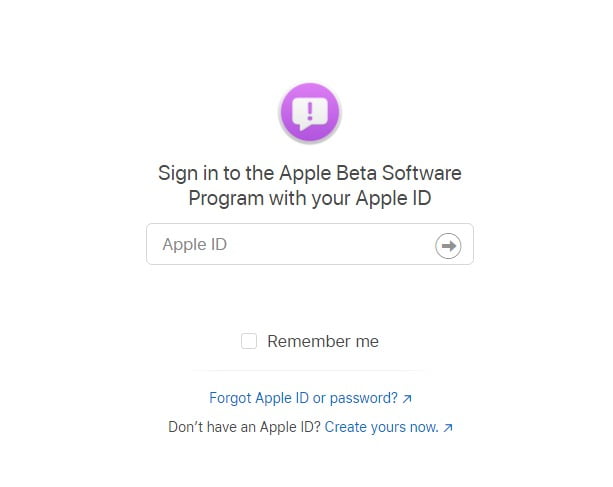
iOS beta sign up program
Sign Up Screen for iOS Beta Program / Image via Apple
  1. Open Apple’s beta software program site on your iPhone using Safari browser. Then, follow the prompts and complete sign up for the beta for your iPhone or iPad using your Apple ID.
  2. After signing in using your Apple ID, select iOS and enroll your device for iOS 15 beta in the “Get started” section. Read through the instructions available on Apple’s portal and create a backup before proceeding.
  3. After you’re done with the backup, click the “Download profile” button and install the beta profile on your device. Allow the pop-up to download the configuration profile.
  4. Now, open the Settings app and select beta profile near the top of the screen. Approve the installation, and your device will restart afterward. Your device will reboot, and after that, you can install beta software updates as a regular software update.
  5. Navigate to Settings>General>Software Update, and you can download updates from there. Make sure that your phone is charged or keep the charger connected once the update is happening.

After installing the beta build, you might not see all the promised iOS 15 features. This build is meant for developers to test their apps before the official rollout of iOS 15. So, it will be buggy. Enjoy iOS 15 beta!


Filed Under: OS Tagged With: Apple, iOS, iOS 15, iPad, iPhone

Related Stories

  • Apple may launch a redesigned iMac at WWDC 2020

    Apple may launch a redesigned iMac at WWDC 2020

  • Apple adds 60 more classes to its sessions event

    Apple adds 60 more classes to its sessions event

  • 5 factors to consider before you upgrade your old iPhone

    5 factors to consider before you upgrade your old iPhone

Shares89FacebookTweetPinLinkedInPrintEmail

About Muhammad Abdullah

Abdullah is a computer scientist turned tech writer and certified Growth Hacker.

Reader Interactions

Share Your Thoughts Cancel reply

Please read our comment policy before submitting your comment. Your email address will not be used or published anywhere. You will only receive comment notifications if you opt to subscribe below.

Primary Sidebar

Become a contributor

We are accepting contributor applications. All applications will be decided in 3 days after applying. To learn more visit the contributors page.
TextSheet Alternative

6 Top Alternatives to Textsheet for 2025

Muhammad Zeshan Sarwar October 5, 2024

battery draining apps

Top 10 battery draining apps to avoid 2025

Muhammad Abdullah October 5, 2024

Recent Stories

  • 6 Top Alternatives to Textsheet for 2025
  • Top 10 battery draining apps to avoid 2025
  • The Benefits of Having a Small Air Compressor for Flat Tires
  • 4 Best Free VPNs for 2025
  • 9 Best Calendar Apps in 2025

Discover

  • About us
  • Newsroom
  • Staff
  • Advertise
  • Send us a tip
  • Startup Submission Questionnaire
  • Brand Kit
  • Contact us

© 2025 TechEngage®. All Rights Reserved. TechEngage® is a project of TechAbout LLC.

TechEngage® is a registered trademark in the United States under Trademark Number 6823709 and in the United Kingdom under Trademark Number UK00003417167. It is also ISSN protected under ISSN 2690-3776 and has OCLC Number 1139335774.

  • Terms & Conditions
  • Privacy Policy