• Skip to primary navigation
  • Skip to main content
  • Skip to primary sidebar

TechEngage®

Connecting mankind with technology

  • News
  • Reviews
  • Cryptocurrency
  • How-to
  • Roundups
  • Science
    • Energy
    • Environment
    • Health
    • Space
  • Apps
  • More
    • Opinion
    • Noteworthy
    • Culture
    • Events
    • Deals
    • Startups
      • Startup Submissions
  • Videos
  • Tools

Google Lens is now live for mobiles

Amnah Fawad Amnah Fawad Updated: December 7, 2018

Google Lens
FacebookTweetPinLinkedInPrintEmail

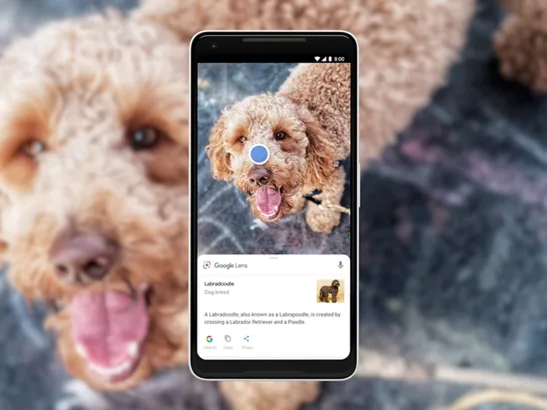
Google launched its Lens feature for phones with which you will be able to ‘explore within the image.’ On its 20th anniversary, Google brought Lens to the Google Images which literally made our day.

Remember how you wished you could just find out where to get that comfy bean bag in that picture from? Well, Google Lens might just be it. Now you can use this feature on your phone.

Its AI technology examines images and explores sub-images that could be of interest. If you select one of these sub-images, Lens will produce other relevant images. Many of these sub-images will have product pages where you can buy them or search for other related images more extensively.

Lens will also let users “draw” on the images to create unique sub-images which they will be able to further search as well.

It’s very simple to use. All you have to do is to press the Lens button on the image and dots will appear on all the things in the image. Tap the dot on the object you want to know about and there you have it; all the details of the similar object will pop up.

Google Lens
Via Google

But here’s the bummer; for now, it is only available for people in the U.S with only English language support. But who knows we might have other language versions in different other parts of the world soon.

Stay tuned for more updates!

This post was originally published on October 25, 2018 and was updated on December 7, 2018.

Filed Under: Browsers Tagged With: Google Lens

Related Stories

  • Firefox 63 Set to Burn All the Tracking Cookies

    Firefox 63 Set to Burn All the Tracking Cookies

  • Mozilla delivered a Petition to make Venmo Transactions Private

    Mozilla delivered a Petition to make Venmo Transactions Private

  • Firefox makers are working on “Scout” – A voice-controlled web browser

FacebookTweetPinLinkedInPrintEmail

About Amnah Fawad

Content writer by profession, but a scientist at heart who secretly believes the conspiracy theories about AI taking over the world. Tech-savvy, sucker of sci-fi thrillers who loves to travel.

Reader Interactions

Share Your Thoughts Cancel reply

Please read our comment policy before submitting your comment. Your email address will not be used or published anywhere. You will only receive comment notifications if you opt to subscribe below.

Primary Sidebar

Become a contributor

We are accepting contributor applications. All applications will be decided in 3 days after applying. To learn more visit the contributors page.
TextSheet Alternative

6 Top Alternatives to Textsheet for 2025

Muhammad Zeshan Sarwar October 5, 2024

battery draining apps

Top 10 battery draining apps to avoid 2025

Muhammad Abdullah October 5, 2024

Recent Stories

  • 6 Top Alternatives to Textsheet for 2025
  • Top 10 battery draining apps to avoid 2025
  • The Benefits of Having a Small Air Compressor for Flat Tires
  • 4 Best Free VPNs for 2025
  • 9 Best Calendar Apps in 2025

Discover

  • About us
  • Newsroom
  • Staff
  • Advertise
  • Send us a tip
  • Startup Submission Questionnaire
  • Brand Kit
  • Contact us

© 2025 TechEngage®. All Rights Reserved. TechEngage® is a project of TechAbout LLC.

TechEngage® is a registered trademark in the United States under Trademark Number 6823709 and in the United Kingdom under Trademark Number UK00003417167. It is also ISSN protected under ISSN 2690-3776 and has OCLC Number 1139335774.

  • Terms & Conditions
  • Privacy Policy