• Skip to primary navigation
  • Skip to main content
  • Skip to primary sidebar
  • Skip to footer
TechEngage

TechEngage®

Hands-on reviews, research-backed buying guides and technology news.

  • News
    • Internet & Social
    • Gadgets
    • Car Tech
    • Business
    • Science & Health
  • Reviews
  • Buying Guides
  • How-to
  • AI
  • Computing
    • Apps
    • Security
    • Gaming
  • More
    • Tools
    • Puzzles
    • Mobile
  • Launchpad
  • Sign in
TechEngage » Computing & Hardware

Intel plans teraflop integrated graphics for 10nm chips in 2019

Avatar for Fazeel Ashraf Fazeel Ashraf Follow Fazeel Ashraf on X Published: Dec 13, 2018 · 5:13 PM ET Updated: Jul 16, 2022 · 3:22 PM ET

NewsNews report. Not a buying guide or hands-on product test.
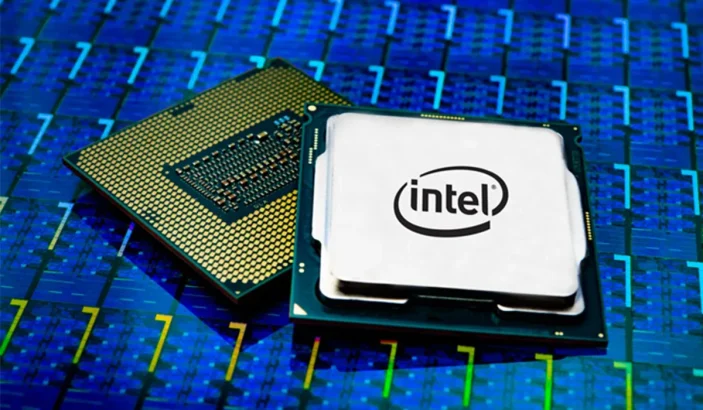
image of intel processors
via Intel
Shares2FacebookTweetPinLinkedInPrint

In life, two things are confirmed, death and integrated graphics suck. Integrated graphics can barely run old titles, so forget about running new games. For this reason, dedicated graphics cards are needed. It seems Intel is looking to mend its ways. Intel is looking to improve graphics.

Intel will introduce its Gen11 series of GPUs from next year. Currently, we are at generation 9, so the processor company is looking to skip a whole series straight to 11. This makes it clear how much Intel wants to boost its graphics performance.

The new generation will be the first GPU to cross one teraflop.

Don’t get me wrong, this is a step in the right direction for Intel, but the graphics performance it provides will still suck. Only, it will suck less this time around. Current Iris GPUs on the market can get close to that performance but are still rarely equipped on popular laptops. One of the company’s competitors is Qualcomm which is all set to go head-to-head with Intel with its 7nm Snapdragon 8cx compute platform.

On the other hand, Intel’s parts will only take them up to AMD, which has provided more than 1 Teraflop performance on some iGPUs for quite a few months now.

The Gen11 GPUs will also use tile-based rendering, dividing scenes into tiles so that portions can be rendered individually. However, the biggest advantage will be in saving memory bandwidth, which is already so low when premium components are used. The new GPUs will also support HDR and Adaptive Sync.

Intel did not provide additional information or benchmark scores to compare with the last generation’s GPUs. However, once we get our hands on the actual GPU, we can give our complete analysis.

It will be a good opportunity for us to compare the GPU regarding performance with last year’s GPUs. Since desktop PCs are open-ended regarding hardware, users can easily open the thing up and install an external GPU whenever they desire.

This isn’t possible on laptops due to their innate flaws. Thanks to technological advancements, users can attach external GPUs to their laptops via Thunderbolt 3. Unfortunately, these things can be costly. Then there is the issue of always carrying an external GPU and its casing when one is traveling. The biggest problem is that only a handful of laptops still have a Thunderbolt 3 port.

We all must be realistic, even if Intel somehow does manage to improve its (insert awful word) graphics. They won’t let you play the latest graphics in 60 FPS. Intel’s chips have never been about graphics. That’s why companies like NVIDIA and AMD exist.

Despite the shortcomings still existing, we might get something better than before. Hopefully, users will get decent FPS when playing recent games in low to medium settings. Intel will also release its first dedicated GPU in more than two decades, which is newsworthy.

The GPU dubbed Intel Xe will face stiff competition from graphics card veterans AMD and NVIDIA. But we will have to wait until 2020 to get a taste of Intel Xe.

Something incorrect? Report an error in this article. Include a source if you have one; your name and email are optional.

Filed Under: Computing & Hardware, Tech News & Analysis Tagged With: AMD, GPU, GraphicsCard, Intel, News, NVIDIA

Related Stories

  • Googlebook Shows How Android 17 And Gemini Intelligence Could Reshape Google’S Ecosystem

    Googlebook Shows How Android 17 and Gemini Intelligence Could Reshape Google’s Ecosystem

    AIMay 16, 2026

  • 3 Best Ssd Enclosures For Usb-C And Usb4

    3 Best SSD Enclosures for USB-C and USB4

    Computing & HardwareOct 10, 2026

  • How To Back Up Windows 11 Files To An External Drive

    How to Back Up Windows 11 Files to an External Drive

    Computing & HardwareOct 10, 2026

Stay on top of technology

Get TechEngage reviews, buying guides and news in your feed.

Follow on Google News
Shares2FacebookTweetPinLinkedInPrint
Avatar for Fazeel Ashraf

Fazeel Ashraf

Tech & Gaming Editor

Fazeel Ashraf is the Tech and Gaming Editor at TechEngage, covering global tech news, social media, gaming releases, and cybersecurity. An IT graduate of the National University of Sciences and Technology, he has written more than 230 articles across the site's news and features coverage.

Joined TechEngage September 2018First article on TechEngage September 2018

Reader Interactions

Share Your Thoughts Cancel reply

Please read our comment policy before submitting your comment. Your email address will not be used or published anywhere. You will only receive comment notifications if you opt to subscribe below.

Primary Sidebar

Google News

Get TechEngage in your feed

Reviews, news, and buying guides as they publish.

Follow on Google News

Recent Stories

  • Windows Screen Recording Guide |
    Apps & SoftwareHow to Screen Record on Windows 11 With AudioOct 10, 2026
  • Chrome Tabs Reloading Techengage |
    Apps & SoftwareHow to Stop Chrome Tabs From ReloadingOct 10, 2026
  • Techengage Windows 11 File Backup |
    Computing & HardwareHow to Back Up Windows 11 Files to an External DriveOct 10, 2026
  • Techengage Ssd Enclosures |
    Computing & Hardware3 Best SSD Enclosures for USB-C and USB4Oct 10, 2026
  • Techengage Office Copilot Frontier |
    AIMicrosoft brings Office editing to Copilot, Frontier firstOct 10, 2026

More in Computing & Hardware

  • Techengage Ssd Enclosures |
    3 Best SSD Enclosures for USB-C and USB4Oct 10, 2026
  • Techengage Windows 11 File Backup |
    How to Back Up Windows 11 Files to an External DriveOct 10, 2026
  • Techengage Usb C Sd Card Readers |
    4 Best USB-C SD Card Readers for Photos and VideoOct 10, 2026
  • Illustration of a USB-C Ethernet adapter connecting a laptop to a blue network cable.
    Best USB-C Ethernet Adapters for MacBook and WindowsOct 8, 2026
More Computing & Hardware stories →

Footer

Discover

  • About TechEngage
  • Company News & Updates
  • Our Team
  • Advertise
  • Send us a tip
  • Submit your company to TechEngage Launchpad Hot
  • TechEngage Brand Kit
  • Contact us
  • Tools & Calculators

Legal pages

  • Editorial Standards
  • Reviews Policy
  • Our Ethics
  • Corrections Policy
  • Affiliate Disclosure
  • Privacy Policy
  • Cookies Policy
  • Terms & Conditions
  • GDPR Compliance
  • Copyright & DMCA

Must reads

  • Best Mechanical Keyboards Under $100
  • Best USB-C Hubs
  • Best Portable SSDs
  • Best Gaming Graphics Cards (GPUs)
  • Best Long-Range Outdoor WiFi Extenders
  • Best Wireless CarPlay Adapters
  • Best Slack Alternatives
  • Best Long-Range Walkie-Talkies

Download our apps

TechEngage app coming soon on the App Store Available onChrome

© 2026 TechEngage®. All Rights Reserved. TechEngage® is a project of TechAbout LLC.

TechEngage® is a registered trademark in the United States under Trademark Number 6823709 and in the United Kingdom under Trademark Number UK00003417167. It is also ISSN protected under ISSN 2690-3776 and has OCLC Number 1139335774.

Contact team@techengage.com · WhatsApp +1-307-381-8801

Your analytics choice
Allow Google Analytics to help us understand readership? You can use the site without it and change this choice anytime.

Privacy details