• Skip to primary navigation
  • Skip to main content
  • Skip to primary sidebar
  • Skip to footer
TechEngage

TechEngage®

Hands-on reviews, research-backed buying guides and technology news.

  • News
  • AI
  • Mobile
  • Apps
  • Reviews
  • More
    • Security
    • Internet & Social
    • Computing
    • Gadgets
    • Gaming
    • Car Tech
    • Business
    • Science & Health
TechEngage » Apps & Software

Chrome 70 to help people get over the controversial login feature of 69

Avatar for Amnah Asghar Amnah Asghar Connect with Amnah Asghar on LinkedIn Published: Sep 26, 2018 · 3:30 PM ET

Chrome 70
Image Courtesy: Google
FacebookTweetPinLinkedInPrint
Chrome 70 is arriving mid-October and people have already started counting on it.

As much as people were happy about the Chrome 69 update, the new login feature left people devastated. Not only did the majority find the new feature confusing but the fact that it was not announced along with the other ‘visible’ features also did not sit well with many.
So what is this new login feature that we are talking about? Those of you who run multiple Google accounts must have noticed it.
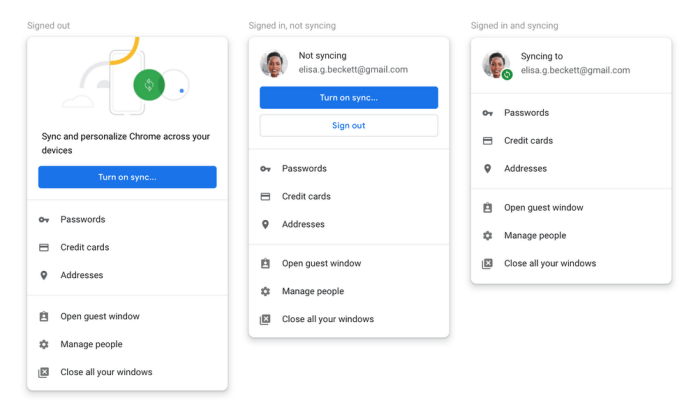
Generally, whenever you log in to any of the Google services from the web, you are automatically signed in using the same account on your Chrome browser. Logging out of your Gmail on the web, for instance, won’t log you out from Chrome. But with the new update, the situation is quite the contrary. If you log out of any of the Google services on the web, you will also be logged out of Chrome or vice versa.
You must have noticed a small sign-in status at the right side of the URL bar. Users have been confusing it with the sync features. Many thought that this sign-in meant that the sync is automatically turned on. In Google’s latest blog post, it clarified this confusion:
”We want to be clear that this change to sign-in does not mean Chrome sync gets turned on. Users who want data like their browsing history, passwords, and bookmarks available on other devices must take additional action, such as turning on sync,’
Further, it also explained the thought process behind this:
”The new UI reminds users which Google Account is signed in. Importantly, this allows us to better help users who share a single device (for example, a family computer). Over the years, we’ve received feedback from users on shared devices that they were confused about Chrome’s sign-in state. We think these UI changes help prevent users from inadvertently performing searches or navigating to websites that could be saved to a different user’s synced account”
Based on the feedback, there will be changes in Chrome 70. While it won’t put an end to the feature completely, it will allow the users to ”turn off linking web-based sign-in with browser-based sign-in—that way users have more control over their experience”.
Google has once again set an example of how to use feedback constructively. We hope others take notes and be as dedicated as Google.
Do let us know what you think in the comments section below!


Filed Under: Apps & Software Tagged With: Chrome 70, Google

Related Stories

  • Googlebook Shows How Android 17 And Gemini Intelligence Could Reshape Google’S Ecosystem

    Googlebook Shows How Android 17 and Gemini Intelligence Could Reshape Google’s Ecosystem

    AIMay 16, 2026

  • Microsoft Confirms October 7 Windows And Surface Event For Local Ai Pcs

    Microsoft Confirms October 7 Windows and Surface Event for Local AI PCs

    Tech News & AnalysisSep 16, 2026

  • Apple Releases Ios 27 And Macos Golden Gate With Siri Ai

    Apple Releases iOS 27 and macOS Golden Gate With Siri AI

    Tech News & AnalysisSep 15, 2026

Stay on top of technology

Get TechEngage reviews, buying guides and news in your feed.

Follow on Google News
FacebookTweetPinLinkedInPrint
Avatar for Amnah Asghar

Amnah Asghar

Consumer Tech Writer

Amnah Asghar is a Consumer Tech Writer at TechEngage who covers smartphones, consumer gadgets, health technology, gaming, and digital security. Across nearly 150 articles, she focuses on turning product specifications and tech news into practical guidance for everyday readers.

Joined TechEngage July 2018First article on TechEngage July 2018

Reader Interactions

Join the Discussion
  1. Avatar for paul campagnapaul campagna says

    October 3, 2018

    Google can kiss it and these “features” are just confusing things to keep people logged in to continue to collect data. I “exit” and it still doesn’t log me out. I turn off “sync” and I have to sign into the damn thing 5 times for every google thing I use everyday. Put it back to what it was and stop messing with things that jeopardize people’s security. You think everyone can figure this crap out? I’ve been around since way before Google was invented and it;s confusing for me. That is 100% on purose to keep you signed in and is only for Google.

    Reply
    • Avatar for Amnah FawadAmnah Fawad says

      October 3, 2018

      I understand your concern. Is that what’s happening? Google better sort this out!

      Reply

Share Your Thoughts Cancel reply

Please read our comment policy before submitting your comment. Your email address will not be used or published anywhere. You will only receive comment notifications if you opt to subscribe below.

Primary Sidebar

Follow us on Google News

Recent Stories

  • Iphone 18 Pro Availability Sept 18 |
    Tech News & AnalysisiPhone 18 Pro and Pro Max Available Today in 65+ CountriesSep 18, 2026
  • Best Portable Monitors 2026 |
    Reviews & Buying GuidesBest Portable Monitors in 2026: 8 Picks for Travel, Work, and PlaySep 18, 2026
  • Samsung One Ui 9 Android 17 Rollout |
    Tech News & AnalysisSamsung Starts One UI 9 (Android 17) Rollout on Galaxy S26 SeriesSep 17, 2026
  • Best Wireless Mice 2026 |
    Reviews & Buying GuidesBest Wireless Mice in 2026: 8 Picks for Work, Travel, and PlaySep 17, 2026
  • Microsoft Windows Surface Event Oct 7 2026 |
    Tech News & AnalysisMicrosoft Confirms October 7 Windows and Surface Event for Local AI PCsSep 16, 2026

More in Apps & Software

  • Microsoft Windows Surface Event Oct 7 2026 |
    Tech News & AnalysisMicrosoft Confirms October 7 Windows and Surface Event for Local AI PCsSep 16, 2026
  • Apple Ios 27 Siri Ai Featured |
    Tech News & AnalysisApple Releases iOS 27 and macOS Golden Gate With Siri AISep 15, 2026
  • Feat |
    Tech News & AnalysisGoogle Launches Gemini Desktop App for Windows With Alt+Space ShortcutSep 11, 2026
  • Ost To Pst Og En |
    Apps & SoftwareStellar Converter for OST Review: Online and Desktop Tools TestedAug 21, 2026
More Apps & Software stories →

Footer

Discover

  • About TechEngage
  • Company News & Updates
  • Our Team
  • Advertise
  • Send us a tip
  • Startup Submissions
  • TechEngage Brand Kit
  • Contact us
  • Tools

Legal pages

  • Editorial Standards
  • Reviews Policy
  • Our Ethics
  • Corrections Policy
  • Affiliate Disclosure
  • Privacy Policy
  • Cookies Policy
  • Terms & Conditions
  • GDPR Compliance
  • Copyright & DMCA

Must reads

  • Best Mechanical Keyboards Under $100
  • Best USB-C Hubs
  • Best Portable SSDs
  • Best Gaming Graphics Cards (GPUs)
  • Best Long-Range Outdoor WiFi Extenders
  • Best Wireless CarPlay Adapters
  • Best Slack Alternatives
  • Best Long-Range Walkie-Talkies

About TechEngage

TechEngage® is an independent technology publication covering tech news, reviews and buying guides since 2003.

Founded
2003
Publisher
TechAbout LLC
ISSN
2690-3776
Google NewsRSS feed

© 2026 TechEngage®. All Rights Reserved. TechEngage® is a project of TechAbout LLC.

TechEngage® is a registered trademark in the United States under Trademark Number 6823709 and in the United Kingdom under Trademark Number UK00003417167. It is also ISSN protected under ISSN 2690-3776 and has OCLC Number 1139335774.

Contact [email protected] · WhatsApp +1-307-381-8801