• Skip to primary navigation
  • Skip to main content
  • Skip to primary sidebar
  • Skip to footer
TechEngage

TechEngage®

Technology Reviews, Guides & Analysis

  • Cryptocurrency
  • Science
    • Energy
    • Environment
    • Health
    • Space
  • Apps
  • More
    • Opinion
    • Noteworthy
    • Culture
    • Events
    • Deals
    • Startups
      • Startup Submissions
  • Videos
  • Tools
TechEngage » Phones

Samsung Galaxy S10 can be unlocked by any fingerprint

Avatar for Ayesha Muhammad Ayesha Muhammad October 17, 2019

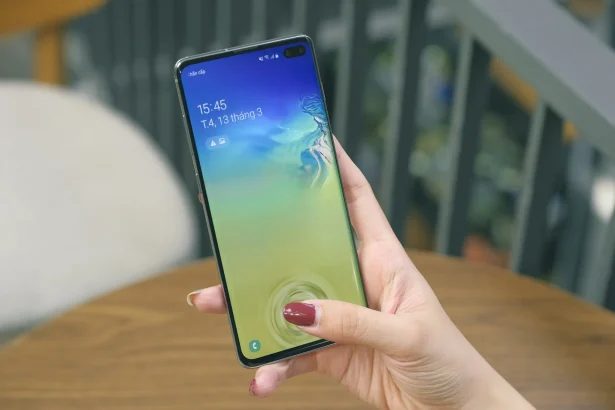
Samsung Galaxy S10+ Fingerprint scanner
Photo by Tinh Khuong on Unsplash
FacebookTweetPinLinkedInPrintEmail

Samsung Galaxy S10’s in-display fingerprint scanner has reportedly malfunctioned, and the company will now have to come up with a software fix as soon as possible, so as not to embarrass itself any more.

The fault was brought to light when a couple in the UK discovered that after using a gel screen protector bought on eBay for £2.70, anyone’s fingerprint impression could unlock the phone. The incident was covered by The Sun Newspaper in UK, and further details revealed that the phone belonged to Lisa Neilson, whose fingerprint was the only one registered on her phone. To protect the screen from damage, she bought a screen cover online and after applying it, not only could she unlock her phone with just any finger, her husband could also do the same (although his fingerprint was not registered on the device at all).

Also read: Samsung Galaxy S10, S10+, and S10e announced

The couple contacted Samsung to report the issue, in answer to which a spokesperson responded: 

“We are aware of the case of s10’s malfunctioning fingerprint and will soon issue a software patch.”

Samsung’s in-display fingerprint scanning makes use of ultrasonic sensors to identify users by way of 3D ridges of fingerprints created on the screen. The exact reasons behind this malfunction are still unknown, though earlier reports suggested that using some screen covers can cause issues with Samsung’s reader or leave small air gaps that hamper the scanning process.

A Samsung spokeswoman said:

“We’re investigating this internally. We recommend all customers to use Samsung authorised accessories, specifically designed for Samsung products.”

Until Samsung finds a solution for this problem, it is best to not use the fingerprint scanning method and resort to unlocking your Galaxy S10 with a PIN, Pattern or Password.

Also read: Samsung Galaxy S10’s ‘Face Unlock’ can be bypassed by a photo

Samsung has issued a recent statement, according to which the new software fix will be out as early as next week. The issue might be faced by users of Galaxy S10, S10+, and S10 5G, as well as Galaxy Note 10 and Note 10+. Furthermore, Samsung has also advised its users not to go for any other screen protectors until the new software patch is released. In the meantime, users should also try removing their screen covers, deleting the previously registered fingerprints, and then re-registering them without the cover.

A software update is planned to be released as early as next week, and once updated, please be sure to scan your fingerprint in its entirety so that the all portions of your fingerprint, including the center and corners have been fully scanned.


Updated with Samsung’s official statement about the fingerprint security issue.

Filed Under: Phones Tagged With: Fingerprint Scanner, Galaxy S10, GalaxyS10Plus, In display fingerprint, news, UltrasonicFingerprint

Related Stories

  • Samsung Galaxy Note 7 Review

    Samsung Galaxy Note 7 Review

  • Samsung Galaxy S7 Review

    Samsung Galaxy S7 Review

  • The Synesthesia Mask

    The Synesthesia Mask

FacebookTweetPinLinkedInPrintEmail
Avatar for Ayesha Muhammad

Ayesha Muhammad

Content Writer

Taking life one step at a time. Obsessed with all good things including writing, reading, travelling, and star-gazing

Joined October 2019

Reader Interactions

Share Your Thoughts Cancel reply

Please read our comment policy before submitting your comment. Your email address will not be used or published anywhere. You will only receive comment notifications if you opt to subscribe below.

Primary Sidebar

TechEngage-Apple-News TechEngage-Google-News

Recent Stories

  • The Complete History of the Internet: From ARPANET to AI (Visual Timeline)
  • The 10 Best-Selling Cars of All Time [Infographic]
  • Best Gaming Graphics Cards (GPUs): 8 Picks From Budget to Enthusiast
  • Best Long-Range Outdoor WiFi Extenders: 8 Tested Picks for Reliable Coverage
  • Best AM Radios for Long-Distance Reception: 10 Tested Picks

Footer

Discover

  • About TechEngage
  • Newsroom
  • Our Team
  • Advertise
  • Send us a tip
  • Startup Submission Questionnaire
  • Brand Kit
  • Contact us

Legal pages

  • Reviews Guarantee & Methodology
  • Community Guidelines
  • Corrections Policy and Practice
  • Cookies Policy
  • Our Ethics
  • Disclaimer
  • GDPR Compliance
  • Privacy Policy
  • Terms and Conditions

Must reads

  • Best AirPods alternatives on Amazon
  • Best PC monitors for gaming on Amazon
  • Best family board games
  • Best video doorbells without subscription
  • Best handheld video game consoles
  • Best all-season tires for snow
  • Best mobile Wi-Fi hotspots
  • Best treadmills on Amazon

Download our apps

TechEngage app coming soon on App Store

© 2026 TechEngage®. All Rights Reserved. TechEngage® is a project of TechAbout LLC.

TechEngage® is a registered trademark in the United States under Trademark Number 6823709 and in the United Kingdom under Trademark Number UK00003417167. It is also ISSN protected under ISSN 2690-3776 and has OCLC Number 1139335774.