• Skip to primary navigation
  • Skip to main content
  • Skip to primary sidebar
  • Skip to footer
TechEngage

TechEngage®

Hands-on reviews, research-backed buying guides and technology news.

  • News
    • Internet & Social
    • Gadgets
    • Car Tech
    • Business
    • Science & Health
  • Reviews
  • Buying Guides
  • How-to
  • AI
  • Computing
    • Apps
    • Security
    • Gaming
  • More
    • Tools
    • Puzzles
    • Mobile
  • Launchpad
  • Sign in
TechEngage » Computing & Hardware

Microsoft Surface Pro 8: 120Hz display, Thunderbolt and more

News

Avatar for Amna Jawaid Amna Jawaid Connect with Amna Jawaid on LinkedIn Published: Sep 24, 2021 · 7:45 AM ET

Microsoft Surface Pro 8
FacebookTweetPinLinkedInPrint

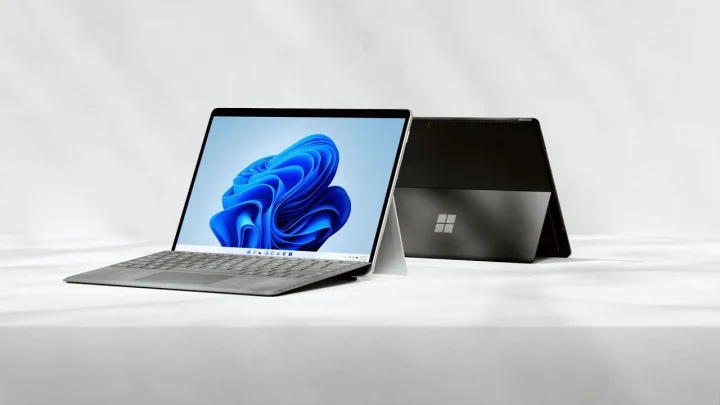
Microsoft has announced an upgraded Surface Pro 8. This upgrade to the famous 2-in-1 is the most significant change since Surface Pro 3. With 11th Gen Intel CoreTM processors, two Thunderbolt 4 ports, and the Intel EvoTM platform, the Surface Pro 8 is twice as fast as the Surface Pro 7. In addition, Microsoft claims that the Surface Pro 8 is the most powerful 2-in-1 on the market, thanks to significant performance improvements, Windows 11, and up to 16 hours of battery life. However, on paper, the iPad Pro M1 competitor seems to be winning the spec war, but iPad Pro M1 beats Surface Pro 8 in performance, thanks to Apple’s M1 Chip.
Surface-Pro-8-Jpg-34Adac99
Surface Pro 8 / image: Microsoft

The Surface Pro 8 will make use of the new Dynamic Refresh Rate feature in Windows 11. Dynamic Refresh Rate works similarly to Apple’s ProMotion high-refresh-rate displays, which is now used in iPhone 13 Pro series, allowing the display to switch between multiple refresh rates depending on the task. It also helps save battery, since the display switches between multiple refresh rates, instead of consistently using the same high refresh rate. This new Surface Pro 8 display is primarily intended to improve inking performance and make touch-based scrolling smoother.

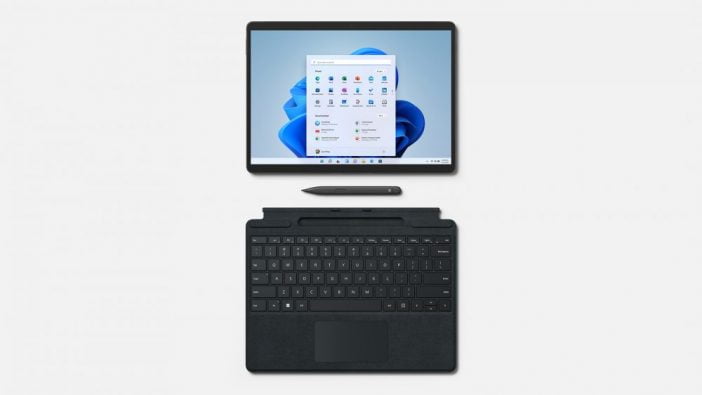
The Surface Slim Pen 2, identical to the keyboard and pen combo featured on the Surface Pro X, is now included with the separate Surface Pro Signature Keyboard. The stylus is chargeable from the keyboard base and has a built-in haptic motor that simulates the sensation of writing on paper.

Microsoft Surface Pro 8 key features:

  • Two USB-C Thunderbolt 4 connections are available for people who want to connect multiple displays, an external hard drive, or an external GPU for gaming.
  • A 12.5 percent brighter 13-inch PixelSense touchscreen display with a refresh rate of up to 120Hz (60Hz by default).
  • Full HD cameras with improved low-light performance have been upgraded.
  • The Surface Slim Pen 2, Microsoft’s improved digital pen, is compatible with the tablet and provides one of the most tactile and realistic experiences available.
Something incorrect? Report an error in this article. Include a source if you have one; your name and email are optional.

Filed Under: Computing & Hardware, Tech News & Analysis Tagged With: Microsoft, Microsoft Surface Event, News

Related Stories

  • Googlebook Shows How Android 17 And Gemini Intelligence Could Reshape Google’S Ecosystem

    Googlebook Shows How Android 17 and Gemini Intelligence Could Reshape Google’s Ecosystem

    AIMay 16, 2026

  • Best Usb-C Power Meters For Chargers And Cables

    Best USB-C Power Meters for Chargers and Cables

    Computing & HardwareSep 28, 2026

  • Best Portable Monitors In 2026: 8 Picks For Travel, Work, And Play

    Best Portable Monitors in 2026: 8 Picks for Travel, Work, and Play

    Computing & HardwareSep 18, 2026

Stay on top of technology

Get TechEngage reviews, buying guides and news in your feed.

Follow on Google News
FacebookTweetPinLinkedInPrint
Avatar for Amna Jawaid

Amna Jawaid

Digital Media Journalist

Amna Jawaid is a journalist specializing in digital media who writes for TechEngage on apps and software, technology news, mobile devices, and science and health tech.

Joined TechEngage September 2021First article on TechEngage September 2021

Reader Interactions

Join the Discussion
  1. Avatar for Saad JavedSaad Javed says

    September 29, 2021

    Definitely getting this. I need to upgrade my surface pro 5. The screen is getting these weird white dots. Hopefully, work will pay for this one like they did for my 5.

    Reply

Share Your Thoughts Cancel reply

Please read our comment policy before submitting your comment. Your email address will not be used or published anywhere. You will only receive comment notifications if you opt to subscribe below.

Primary Sidebar

Google News

Get TechEngage in your feed

Reviews, news, and buying guides as they publish.

Follow on Google News

Recent Stories

  • Usb C Power Meters Techengage |
    Computing & HardwareBest USB-C Power Meters for Chargers and CablesSep 28, 2026
  • Akamai Anthropic Cloud Techengage |
    Tech News & AnalysisAkamai’s $11.6 billion Anthropic cloud deal: costs, timeline and CPU strategySep 27, 2026
  • Openai Agent Dns Incident Techengage |
    Tech News & AnalysisOpenAI pauses advanced-model research after agent bypasses network restrictionsSep 27, 2026
  • Ai Markets Feat |
    AIThree CEOs Asked to Slow Down. The President Said No and the Market Fell 3 Percent. Hassan Taher on What Actually Happened.Sep 21, 2026
  • Iphone 18 Pro Availability Sept 18 |
    Tech News & AnalysisiPhone 18 Pro and Pro Max Available Today in 65+ CountriesSep 18, 2026

More in Computing & Hardware

  • Usb C Power Meters Techengage |
    Best USB-C Power Meters for Chargers and CablesSep 28, 2026
  • Best Portable Monitors 2026 |
    Best Portable Monitors in 2026: 8 Picks for Travel, Work, and PlaySep 18, 2026
  • Best Wireless Mice 2026 |
    Best Wireless Mice in 2026: 8 Picks for Work, Travel, and PlaySep 17, 2026
  • Best Mechanical Keyboards Under 100 Featured |
    Best Mechanical Keyboards Under $100: 8 Picks for 2026Sep 15, 2026
More Computing & Hardware stories →

Footer

Discover

  • About TechEngage
  • Company News & Updates
  • Our Team
  • Advertise
  • Send us a tip
  • Submit your company to TechEngage Launchpad Hot
  • TechEngage Brand Kit
  • Contact us
  • Tools & Calculators

Legal pages

  • Editorial Standards
  • Reviews Policy
  • Our Ethics
  • Corrections Policy
  • Affiliate Disclosure
  • Privacy Policy
  • Cookies Policy
  • Terms & Conditions
  • GDPR Compliance
  • Copyright & DMCA

Must reads

  • Best Mechanical Keyboards Under $100
  • Best USB-C Hubs
  • Best Portable SSDs
  • Best Gaming Graphics Cards (GPUs)
  • Best Long-Range Outdoor WiFi Extenders
  • Best Wireless CarPlay Adapters
  • Best Slack Alternatives
  • Best Long-Range Walkie-Talkies

Download our apps

TechEngage app coming soon on App Store

© 2026 TechEngage®. All Rights Reserved. TechEngage® is a project of TechAbout LLC.

TechEngage® is a registered trademark in the United States under Trademark Number 6823709 and in the United Kingdom under Trademark Number UK00003417167. It is also ISSN protected under ISSN 2690-3776 and has OCLC Number 1139335774.

Contact team@techengage.com · WhatsApp +1-307-381-8801

Your analytics choice
Allow Google Analytics to help us understand readership? You can use the site without it and change this choice anytime.

Privacy details