• Skip to primary navigation
  • Skip to main content
  • Skip to primary sidebar
  • Skip to footer
TechEngage

TechEngage®

Hands-on reviews, research-backed buying guides and technology news.

  • News
  • AI
  • Mobile
  • Apps
  • Reviews
  • More
    • Security
    • Internet & Social
    • Computing
    • Gadgets
    • Gaming
    • Car Tech
    • Business
    • Science & Health
TechEngage » Mobile

Incredible things your iPhone can do

Avatar for Ali Raza Ali Raza Published: Apr 28, 2021 · 4:20 PM ET

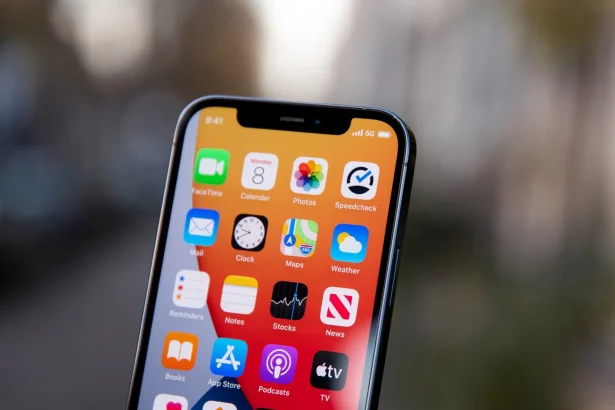
iPhone 12 Pro image
Shares27FacebookTweetPinLinkedInPrint

How well do you know your iPhone? iPhones have been with us for a decade now, and the best thing about them is that they get better with every new upgrade. That explains why loyal iPhone users always look forward to a new iPhone series launch. Being the sophisticated phones they are, quite a number of users can be forgiven for not being fully acquainted with just what their favorite phone model can do.

The following is a list of cool things to do with your iPhone, some of which you probably had no idea about:

1. iPhones can personalize ringtones

Want to identify callers using some of your favorite ringtones? You can do it with an iPhone, and all you have to do is access your contact list, select your person of interest and tap the Edit button, then Ringtone option is to select your ringtone of choice.

2. It can work without the physical Power button

Just spoilt your iPhone’s power button? No need to fret because there is an alternative way to lock it or turn it off, which is through enabling AssistiveTouch, a feature you can access from the phone’s settings. Its icon appears on the screen and works just like the physical power button.

3. Regulate data usage

Some apps can really consume large amounts of cellular data. With iPhones, you can choose which apps to use cellular data and which ones to only use Wi-Fi.

This means that as a student, you shouldn’t fear running out of data intended to find information about writing services.

4. Tracks popular apps

If you are always on the move and would like to know the most used apps in the different places you visit, tap on the “Near Me” option in the app store. News apps happen to be the majority of “Near Me” apps.

5. Siri can be manipulated to your preference

Not only can you change voice gender as a modification for Siri. There are also different features to be toyed around with such as British and Australian accents. You can make these changes by going to your iPhone’s Settings.

6. Do not disturb feature is adjustable any time you need

Want to take a nap and not necessarily turn off the phone to avoid disturbances? Go to Settings, Do Not Disturb option, and tap the “scheduled” menu option. Your phone will shift to DND mode for whichever duration you wish.

7. Airplane mode is a battery saver

You know those times when you need to use your phone, but the battery is running low, it happens to everyone once in a while. You can activate the airplane mode when needed. Another impressive iPhone airplane mode hack is that it charges faster while on the mode.

8. Access online essay writing services through your iPhone

iPhones are some of the coolest and reliable gadgets that any student could own. Students are not only able to enjoy various iPhone features like the magnificent camera, but they can also utilize it to browse the internet to search for a reliable college homework helper. It is great to know that there is a solution to pending essays; browsing through paper writing websites on an iPhone is easy.

9. Change Siri’s voice

The latest iOS 14.5 update brings the ability to change Siri’s voice. You can now change Siri’s voice and select from the preferences.

10. Track your stuff with AirTags

Apple finally announced the long-awaited AirTags in their Spring Loaded event. You can now tag your wallets, bags, and even keys with Apple AirTags and find them with the help of your iPhone.

11. Scan QR code with camera

With an iPhone camera, you can also scan any QR code and get related info. The QR code scanning through the camera app enables you to visit websites, connect with Wi-Fi and add contacts in just a blink of the eye. Just scan the QR code, and it will display the information on the screen which you can follow to proceed further.

12. Use Widgets

With iOS 14, Apple brought widgets to the iPhone. Users can now add widgets on the screen and enjoy the ease that widgets bring to life. Although Android has this feature for a long time, but the wait for widgets on iOS is worth it. The widgets works perfectly fine on iPhones. The live weather and gallery widget looks very beautiful on the screen.


Filed Under: Mobile Tagged With: Buying Guide, iPhone, Tips and Tricks

Related Stories

  • Best Portable Monitors In 2026: 8 Picks For Travel, Work, And Play

    Best Portable Monitors in 2026: 8 Picks for Travel, Work, and Play

    Reviews & Buying GuidesSep 18, 2026

  • Best Wireless Mice In 2026: 8 Picks For Work, Travel, And Play

    Best Wireless Mice in 2026: 8 Picks for Work, Travel, and Play

    Reviews & Buying GuidesSep 17, 2026

  • Best Power Banks For Travel: 8 Tsa-Friendly Picks For 2026

    Best Power Banks for Travel: 8 TSA-Friendly Picks for 2026

    Reviews & Buying GuidesSep 16, 2026

Stay on top of technology

Get TechEngage reviews, buying guides and news in your feed.

Follow on Google News
Shares27FacebookTweetPinLinkedInPrint
Avatar for Ali Raza

Ali Raza

Business & Cybersecurity Analyst

Ali Raza is a Business and Cybersecurity Analyst at TechEngage with more than 180 published articles covering enterprise technology, business and fintech, cybersecurity, and software tools. His reporting connects business strategy with the technology behind it to help readers make informed decisions.

Joined TechEngage March 2009First article on TechEngage May 2010

Reader Interactions

Share Your Thoughts Cancel reply

Please read our comment policy before submitting your comment. Your email address will not be used or published anywhere. You will only receive comment notifications if you opt to subscribe below.

Primary Sidebar

Follow us on Google News

Recent Stories

  • Iphone 18 Pro Availability Sept 18 |
    Tech News & AnalysisiPhone 18 Pro and Pro Max Available Today in 65+ CountriesSep 18, 2026
  • Best Portable Monitors 2026 |
    Reviews & Buying GuidesBest Portable Monitors in 2026: 8 Picks for Travel, Work, and PlaySep 18, 2026
  • Samsung One Ui 9 Android 17 Rollout |
    Tech News & AnalysisSamsung Starts One UI 9 (Android 17) Rollout on Galaxy S26 SeriesSep 17, 2026
  • Best Wireless Mice 2026 |
    Reviews & Buying GuidesBest Wireless Mice in 2026: 8 Picks for Work, Travel, and PlaySep 17, 2026
  • Microsoft Windows Surface Event Oct 7 2026 |
    Tech News & AnalysisMicrosoft Confirms October 7 Windows and Surface Event for Local AI PCsSep 16, 2026

More in Mobile

  • Iphone 18 Pro Availability Sept 18 |
    Tech News & AnalysisiPhone 18 Pro and Pro Max Available Today in 65+ CountriesSep 18, 2026
  • Samsung One Ui 9 Android 17 Rollout |
    Tech News & AnalysisSamsung Starts One UI 9 (Android 17) Rollout on Galaxy S26 SeriesSep 17, 2026
  • Apple Ios 27 Siri Ai Featured |
    Tech News & AnalysisApple Releases iOS 27 and macOS Golden Gate With Siri AISep 15, 2026
  • Battery Draining Apps Jpg |
    MobileTop 10 Battery Draining Apps to Avoid in 2026Oct 5, 2024
More Mobile stories →

Footer

Discover

  • About TechEngage
  • Company News & Updates
  • Our Team
  • Advertise
  • Send us a tip
  • Startup Submissions
  • TechEngage Brand Kit
  • Contact us
  • Tools

Legal pages

  • Editorial Standards
  • Reviews Policy
  • Our Ethics
  • Corrections Policy
  • Affiliate Disclosure
  • Privacy Policy
  • Cookies Policy
  • Terms & Conditions
  • GDPR Compliance
  • Copyright & DMCA

Must reads

  • Best Mechanical Keyboards Under $100
  • Best USB-C Hubs
  • Best Portable SSDs
  • Best Gaming Graphics Cards (GPUs)
  • Best Long-Range Outdoor WiFi Extenders
  • Best Wireless CarPlay Adapters
  • Best Slack Alternatives
  • Best Long-Range Walkie-Talkies

About TechEngage

TechEngage® is an independent technology publication covering tech news, reviews and buying guides since 2003.

Founded
2003
Publisher
TechAbout LLC
ISSN
2690-3776
Google NewsRSS feed

© 2026 TechEngage®. All Rights Reserved. TechEngage® is a project of TechAbout LLC.

TechEngage® is a registered trademark in the United States under Trademark Number 6823709 and in the United Kingdom under Trademark Number UK00003417167. It is also ISSN protected under ISSN 2690-3776 and has OCLC Number 1139335774.

Contact [email protected] · WhatsApp +1-307-381-8801