• Skip to primary navigation
  • Skip to main content
  • Skip to primary sidebar
  • Skip to footer
TechEngage

TechEngage®

Hands-on reviews, research-backed buying guides and technology news.

  • News
    • Internet & Social
    • Gadgets
    • Car Tech
    • Business
    • Science & Health
  • Reviews
  • Buying Guides
  • How-to
  • AI
  • Computing
    • Apps
    • Security
    • Gaming
  • More
    • Tools
    • Puzzles
    • Mobile
  • Launchpad
  • Sign in
TechEngage » Apps & Software

Telegram introduces group video calls, screen sharing, and more animated emojis

Avatar for Sheharyar Ahmad Saeed Sheharyar Ahmad Saeed Connect with Sheharyar Ahmad Saeed on LinkedIn Published: Jun 28, 2021 · 8:01 AM ET

NewsNews report. Not a buying guide or hands-on product test.
Telegram logo
Shares12FacebookTweetPinLinkedInPrint

Telegram has rolled out a series of new updates. Among them, one feature will enable users to share their screens mutually while remaining in the group video call.
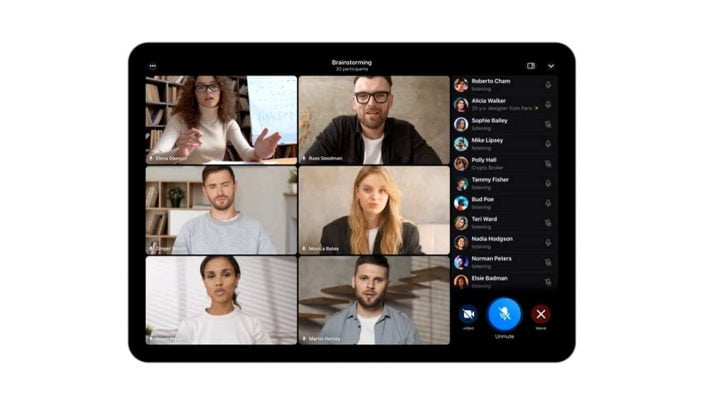
Screenshot Of Participants In Video Call Of Telegram

Users now can shift from ongoing group voice calls to group video call. They merely need to tap the icon of the camera on the call screen.  While the group voice call on Telegram features unlimited hosts, nevertheless the group video call has a restriction of only 30 participants. The company also aims to increase the video call limit of participants soon.

Group Video Calls are here. With screen sharing, crisp audio and smooth animations, all optimized for phones, tablets and computers. This is big – and will only get bigger. ? https://t.co/1S7ZkbRhJL

— Telegram Messenger (@telegram) June 25, 2021

This nascent feature is available on mobile and desktop. Admins can also pin a particular user’s video feed, which will appear to new participants as the first screen they see when they join. To make a video full screen on the user’s device, the user can tap any video screen.
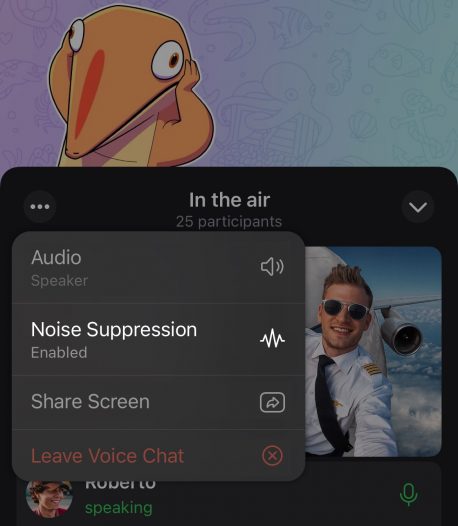
A Screenshot Of Noise Suppression In Telegram

Sharing screen is of significant importance- another feature Telegram has added. To enable this feature on a tablet or smartphone, users need to tap the three-dot menu button and select Share Screen. The most recent user whose screen was shared will automatically be pinned on the desktop. The company is also improving voice chat audio clarity by enabling noise suppression. However, the users are allowed to disable noise suppression. This new feature would bring Telegram’s video call experience in line with Zoom and Google Meet.
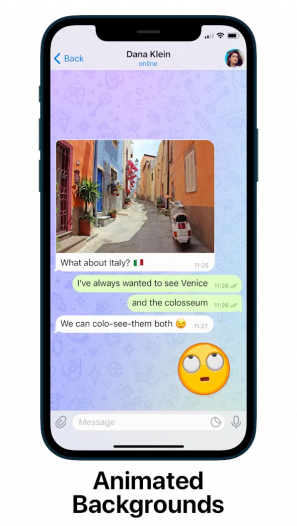
Screenshot Of Changing Wallpaper During Chat In Telegram

Among the series of updates, Telegram has also introduced some interface-level changes. For example, animated backgrounds are coming to Telegram for the first. In addition, Telegram is introducing multi-color gradient wallpapers that will keep changing as users continue to chat. These updates have also helped users who largely respond through emojis and stickers, and they can also now import new stickers and animated emojis.
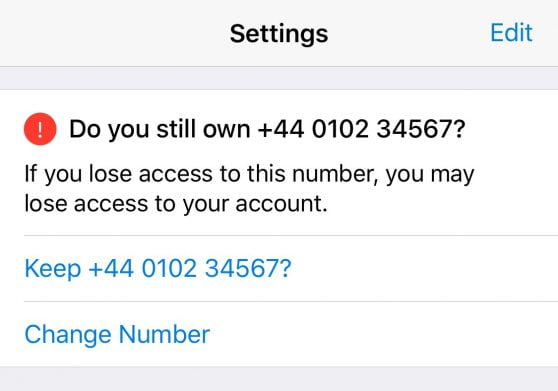
Screenshot Of Message Asking For A Change In Ios Contact Number In Telegram

In iOS, a new login reminder will be displayed in Settings so you can update your phone number quickly. In the next update, Android users will receive a similar login reminder.

A menu button has also been added to Telegram that allows users to browse and send commands with a single tap, removing the need to paste the text into the textbox.

Despite WhatsApp’s popularity, Telegram remains an excellent alternative. A video-calling feature was added during the pandemic to help it gain popularity. Now, its new group video calling and screen sharing features aim to take on video conferencing tools.

Whatsapp’s recent controversial updates regarding the data security of its users had spawned a news cycle that subsequently shot Telegram and other similar messaging apps back into the mainstream. As of January, 

Telegram’s CEO Pavel Durov said the company had 500 million active users, including a large number of converted users who made the switch after Facebook-owned rival chat platform WhatsApp made a mess of its new privacy policy. 

Whatsapp users have been using group audio and voice calls since 2018, but it was only in March 2021 when Whatsapp began offering audio and video calling features on desktop.




Related reading

  • Donald Trump Succeeded in Launching the Truth Social App in the U.S.
  • 5 Reasons Why You Need a Construction Inventory System
  • Business Software That Can Help
Something incorrect? Report an error in this article. Include a source if you have one; your name and email are optional.

Filed Under: Apps & Software, Tech News & Analysis Tagged With: News, Telegram

Related Stories

  • Googlebook Shows How Android 17 And Gemini Intelligence Could Reshape Google’S Ecosystem

    Googlebook Shows How Android 17 and Gemini Intelligence Could Reshape Google’s Ecosystem

    AIMay 16, 2026

  • How To Screen Record On Windows 11 With Audio

    How to Screen Record on Windows 11 With Audio

    Apps & SoftwareOct 10, 2026

  • How To Stop Chrome Tabs From Reloading

    How to Stop Chrome Tabs From Reloading

    Apps & SoftwareOct 10, 2026

Stay on top of technology

Get TechEngage reviews, buying guides and news in your feed.

Follow on Google News
Shares12FacebookTweetPinLinkedInPrint
Avatar for Sheharyar Ahmad Saeed

Sheharyar Ahmad Saeed

Mobile & Events Reporter

Sheharyar Ahmad Saeed is a Mobile and Events Reporter at TechEngage who covers smartphone launches, apps, technology conferences, and social media. He has written more than 170 articles, making complex product announcements easy to follow for everyday readers.

Joined TechEngage October 2020First article on TechEngage October 2020

Reader Interactions

Share Your Thoughts Cancel reply

Please read our comment policy before submitting your comment. Your email address will not be used or published anywhere. You will only receive comment notifications if you opt to subscribe below.

Primary Sidebar

Google News

Get TechEngage in your feed

Reviews, news, and buying guides as they publish.

Follow on Google News

Recent Stories

  • Nscale Anthropic Second Compute Deal |
    Tech News & AnalysisAnthropic and Nscale in Talks on Second $45B Compute Deal, Report SaysOct 19, 2026
  • Stellar Pst Repair Desktop Vs Online Techengage |
    Reviews & Buying GuidesStellar Repair for Outlook Review: Desktop vs. Online PST RepairOct 19, 2026
  • Health Conscious Home Cleaning Fana Anwar |
    Culture & LifestyleHow to Build a More Effective, Health-Conscious Home Cleaning RoutineOct 19, 2026
  • Google Home Local Matter Hue |
    Consumer Tech & GadgetsGoogle Home update brings local Matter control to Hue lightsOct 15, 2026
  • Windows Screen Recording Guide |
    Apps & SoftwareHow to Screen Record on Windows 11 With AudioOct 10, 2026

More in Apps & Software

  • Windows Screen Recording Guide |
    How to Screen Record on Windows 11 With AudioOct 10, 2026
  • Chrome Tabs Reloading Techengage |
    How to Stop Chrome Tabs From ReloadingOct 10, 2026
  • 136181 7Effec8402C5Ea64 |
    What Microsoft Announced on October 7: Surface Laptop Ultra, RTX Spark Dev Box, and Windows AISep 16, 2026
  • TechEngage news graphic: iOS 27 Is Out With Siri AI, with an illustrated laptop and phone showing an AI assistant
    Apple Releases iOS 27 and macOS Golden Gate With Siri AISep 15, 2026
More Apps & Software stories →

Footer

Discover

  • About TechEngage
  • Company News & Updates
  • Our Team
  • Advertise
  • Send us a tip
  • Submit your company to TechEngage Launchpad Hot
  • TechEngage Brand Kit
  • Contact us
  • Tools & Calculators

Legal pages

  • Editorial Standards
  • Reviews Policy
  • Our Ethics
  • Corrections Policy
  • Affiliate Disclosure
  • Privacy Policy
  • Cookies Policy
  • Terms & Conditions
  • GDPR Compliance
  • Copyright & DMCA

Must reads

  • Best Mechanical Keyboards Under $100
  • Best USB-C Hubs
  • Best Portable SSDs
  • Best Gaming Graphics Cards (GPUs)
  • Best Long-Range Outdoor WiFi Extenders
  • Best Wireless CarPlay Adapters
  • Best Slack Alternatives
  • Best Long-Range Walkie-Talkies

Download our apps

TechEngage app coming soon on the App Store Available onChrome

© 2026 TechEngage®. All Rights Reserved. TechEngage® is a project of TechAbout LLC.

TechEngage® is a registered trademark in the United States under Trademark Number 6823709 and in the United Kingdom under Trademark Number UK00003417167. It is also ISSN protected under ISSN 2690-3776 and has OCLC Number 1139335774.

Contact team@techengage.com · WhatsApp +1-307-381-8801

Your analytics choice
Allow Google Analytics to help us understand readership? You can use the site without it and change this choice anytime.

Privacy details