
• Skip to primary navigation
  • Skip to main content
  • Skip to primary sidebar
  • Skip to footer
TechEngage

TechEngage®

Hands-on reviews, research-backed buying guides and technology news.

  • News
    • Internet & Social
    • Gadgets
    • Car Tech
    • Business
    • Science & Health
  • Reviews
  • Buying Guides
  • How-to
  • AI
  • Computing
    • Apps
    • Security
    • Gaming
  • More
    • Tools
    • Puzzles
    • Mobile
  • Launchpad
  • Sign in
TechEngage » Business & Fintech

The five safest Bitcoin wallets for Android

Avatar for Ali Raza Ali Raza Published: Mar 31, 2020 · 12:21 PM ET Updated: Jan 6, 2024 · 7:04 PM ET

Research-based comparisonBased on the sources identified in this article. Not a TechEngage hands-on test. How we evaluate
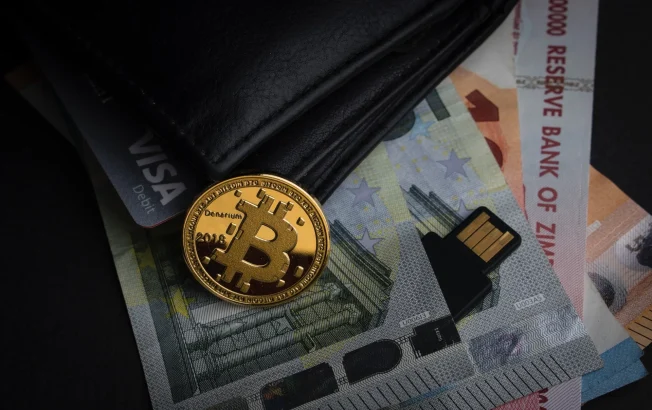
bitcoin wallets
Photo by Aleksi Räisä on Unsplash
Shares43FacebookTweetPinLinkedInPrint

A Bitcoin wallet is a digital tool allowing users to store, send, and receive Bitcoin securely. It consists of two main components: a public address, which is used to receive funds, and a private key, which is utilized to sign off on transactions. Regarding Android devices, Bitcoin wallets for this platform are specifically designed to cater to the mobile environment. These wallets offer the convenience of managing Bitcoin on the go, often through dedicated apps, while prioritizing security features to protect the user’s digital assets. They may provide options for backing up keys, integrating hardware wallets for added security, and ensuring ease of use for the Android platform.

Choosing the right wallet is crucial when safeguarding your Bitcoin on your Android device. Here are five of the safest Bitcoin wallets for Android that offer top-notch security features:

Table of Contents

  • Ledger Nano X
  • Trezor
  • Exodus
  • Coinomi
  • Mycelium

Ledger Nano X

The Ledger Nano X is a hardware wallet that provides a high level of security for storing your Bitcoin. It offers Bluetooth connectivity to your Android device, allowing you to manage your assets on the go while keeping your private keys offline.

Pros:

  • High level of security
  • Bluetooth connectivity for on-the-go management
  • Offline private keys for added security

Cons:

  • Requires purchasing a physical device
  • Higher price point compared to software wallets

Trezor

Trezor is another popular hardware wallet that is compatible with Android devices. It offers strong security features such as PIN protection, passphrase support, and a secure screen for verifying transaction details.

Pros:

  • Strong security features, including PIN protection and passphrase support
  • Secure screen for transaction verification
  • Compatibility with Android devices

Cons:

  • Cost of purchasing the physical device
  • It may not be as convenient for frequent transactions

Exodus

Exodus is a mobile wallet with a user-friendly interface and built-in exchange features. It supports multiple cryptocurrencies, including Bitcoin, and provides security features like Touch ID, Face ID, and a secure PIN.

Pros:

  • User-friendly interface
  • Built-in exchange features
  • Security features such as Touch ID and Face ID

Cons:

  • Does not support as many cryptocurrencies as some other wallets
  • It may not offer the same level of security as hardware wallets

Coinomi

Coinomi is a popular multi-coin wallet for Android users with strong security and privacy features. It uses strong encryption and allows you to retain control of your private keys.

Pros:

  • Strong security and privacy features
  • Control of private keys
  • Support for multiple cryptocurrencies

Cons:

  • Security risks associated with being a software wallet
  • Some users may prefer a hardware wallet for enhanced security

Mycelium

Mycelium is a well-established Bitcoin wallet for Android known for its security and privacy features. It offers features like a local trader, secure backup, and compatibility with hardware wallets for added security.

Pros:

  • Security and privacy features
  • Local trader feature
  • Compatibility with hardware wallets

Cons:

  • It may not be as beginner-friendly as some other wallets
  • Security risks associated with being a software wallet

Before choosing a Bitcoin wallet for your Android device, consider security features, user experience, and community trust. It’s also important to regularly update your wallet software and follow best practices for securing your digital assets.

By selecting one of these top Bitcoin wallets for Android, you can have peace of mind knowing that your Bitcoin is stored in a secure and user-friendly environment.

Related reading

  • What is DeFi, and why it’s a hot topic in the cryptocurrency
  • Cryptocurrency Market is Plunging: Bitcoin Crash
  • The security concerns of cryptocurrencies & how to protect yourself while trading
  • Bitcoin skyrockets to its highest value of $21,000
Something incorrect? Report an error in this article. Include a source if you have one; your name and email are optional.

Filed Under: Business & Fintech, Reviews & Buying Guides Tagged With: Bitcoin, Cryptocurrency

Related Stories

  • Illustration of a USB-C Ethernet adapter connecting a laptop to a blue network cable.

    Best USB-C Ethernet Adapters for MacBook and Windows

    Computing & HardwareOct 8, 2026

  • Illustration of a USB-C power meter between a charging cable and a laptop.

    Best USB-C Power Meters for Chargers and Cables

    Computing & HardwareSep 28, 2026

  • Best Portable Monitors In 2026: 8 Picks For Travel, Work, And Play

    Best Portable Monitors in 2026: 8 Picks for Travel, Work, and Play

    Computing & HardwareSep 18, 2026

Stay on top of technology

Get TechEngage reviews, buying guides and news in your feed.

Follow on Google News
Shares43FacebookTweetPinLinkedInPrint
Avatar for Ali Raza

Ali Raza

Business & Cybersecurity Analyst

Ali Raza is a Business and Cybersecurity Analyst at TechEngage with more than 180 published articles covering enterprise technology, business and fintech, cybersecurity, and software tools. His reporting connects business strategy with the technology behind it to help readers make informed decisions.

Joined TechEngage March 2009First article on TechEngage May 2010

Reader Interactions

Share Your Thoughts Cancel reply

Please read our comment policy before submitting your comment. Your email address will not be used or published anywhere. You will only receive comment notifications if you opt to subscribe below.

Primary Sidebar

Google News

Get TechEngage in your feed

Reviews, news, and buying guides as they publish.

Follow on Google News

Recent Stories

  • Windows Screen Recording Guide |
    Apps & SoftwareHow to Screen Record on Windows 11 With AudioOct 10, 2026
  • Chrome Tabs Reloading Techengage |
    Apps & SoftwareHow to Stop Chrome Tabs From ReloadingOct 10, 2026
  • Techengage Windows 11 File Backup |
    Computing & HardwareHow to Back Up Windows 11 Files to an External DriveOct 10, 2026
  • Techengage Ssd Enclosures |
    Computing & Hardware3 Best SSD Enclosures for USB-C and USB4Oct 10, 2026
  • Techengage Office Copilot Frontier |
    AIMicrosoft brings Office editing to Copilot, Frontier firstOct 10, 2026

More in Business & Fintech

  • App Developer Woman Jpg |
    How to Make an App Without Experience: A Practical GuideJun 10, 2023
  • Blog13 Jpg |
    Technology Blogs for Guest Posting: 35 Publications Open to WritersMay 20, 2023
  • Crypto Investment Mistakes Jpg |
    Common mistakes new crypto investors makeMar 1, 2023
  • Bitcoin Success Stories |
    Top Bitcoin Billionaires and Their Success StoriesJun 30, 2022
More Business & Fintech stories →

Footer

Discover

  • About TechEngage
  • Company News & Updates
  • Our Team
  • Advertise
  • Send us a tip
  • Submit your company to TechEngage Launchpad Hot
  • TechEngage Brand Kit
  • Contact us
  • Tools & Calculators

Legal pages

  • Editorial Standards
  • Reviews Policy
  • Our Ethics
  • Corrections Policy
  • Affiliate Disclosure
  • Privacy Policy
  • Cookies Policy
  • Terms & Conditions
  • GDPR Compliance
  • Copyright & DMCA

Must reads

  • Best Mechanical Keyboards Under $100
  • Best USB-C Hubs
  • Best Portable SSDs
  • Best Gaming Graphics Cards (GPUs)
  • Best Long-Range Outdoor WiFi Extenders
  • Best Wireless CarPlay Adapters
  • Best Slack Alternatives
  • Best Long-Range Walkie-Talkies

Download our apps

TechEngage app coming soon on the App Store Available onChrome

© 2026 TechEngage®. All Rights Reserved. TechEngage® is a project of TechAbout LLC.

TechEngage® is a registered trademark in the United States under Trademark Number 6823709 and in the United Kingdom under Trademark Number UK00003417167. It is also ISSN protected under ISSN 2690-3776 and has OCLC Number 1139335774.

Contact team@techengage.com · WhatsApp +1-307-381-8801

Your analytics choice
Allow Google Analytics to help us understand readership? You can use the site without it and change this choice anytime.

Privacy details
