


I’ve been building PCs since the GeForce 8800 GT era, and I’ve never seen a GPU market this complicated. Three manufacturers now compete across five price tiers, AI upscaling has rewritten what “playable frame rates” means, and VRAM requirements have doubled in just two years. A card that ran everything at ultra settings in 2023 struggles with medium textures in Unreal Engine 5 titles today. The 8 GB buffer that seemed adequate two years ago now bottlenecks games like Indiana Jones and the Great Circle, Star Wars Outlaws, and Black Myth: Wukong at anything above 1080p.
Then there’s the pricing situation. NVIDIA’s RTX 50-series Blackwell cards launched at higher MSRPs than their predecessors, and street prices still float above MSRP for certain models months after launch. AMD countered by skipping the high-end entirely with RDNA 4, focusing the RX 9070 series on the mid-range where most people actually buy. Intel’s Arc B580 quietly became the best budget GPU you can buy for under $250. The result is a market where every price bracket has a clear best option, but the “best” answer depends heavily on your resolution target, gaming priorities, and how long you want the card to last before the next upgrade.
This guide cuts through the noise. Every recommendation here is based on actual benchmark data, real-world game testing, and practical considerations like VRAM headroom, power consumption, and driver maturity. Whether you’re building a 4K powerhouse, a sensible 1440p rig, or a budget gaming setup paired with a strong CPU, the right GPU is here.
Best Gaming GPUs at a Glance


What Actually Matters When Buying a GPU in 2026
GPU shopping in 2026 involves more variables than raw performance numbers. These factors determine whether a card feels fast or frustrating two years from now.
VRAM: The Silent Dealbreaker
Video memory capacity has become the single most important spec for future-proofing. Modern game engines pre-load massive texture pools into VRAM, and when the buffer fills, performance falls off a cliff with stuttering that no amount of raw GPU power fixes. At 1080p, 8 GB remains workable for most titles in 2026. At 1440p, 12 GB is the comfortable minimum, and several demanding games already push past it at ultra settings. At 4K, 16 GB is the new baseline, and 24 GB provides breathing room for the next generation of Unreal Engine 5 games.
This is why the RTX 5070’s 12 GB buffer generates debate despite its impressive performance. For a $549 card that competes with the previous-generation RTX 4090 in rasterization (with DLSS 4 enabled), the 192-bit memory bus and 12 GB VRAM will be the limiting factor before the GPU core runs out of horsepower, especially at 4K. The RTX 5070 Ti and RX 9070 XT both offer 16 GB, which provides meaningfully more longevity.
AI Upscaling: DLSS 4 vs. FSR 4 vs. XeSS 2
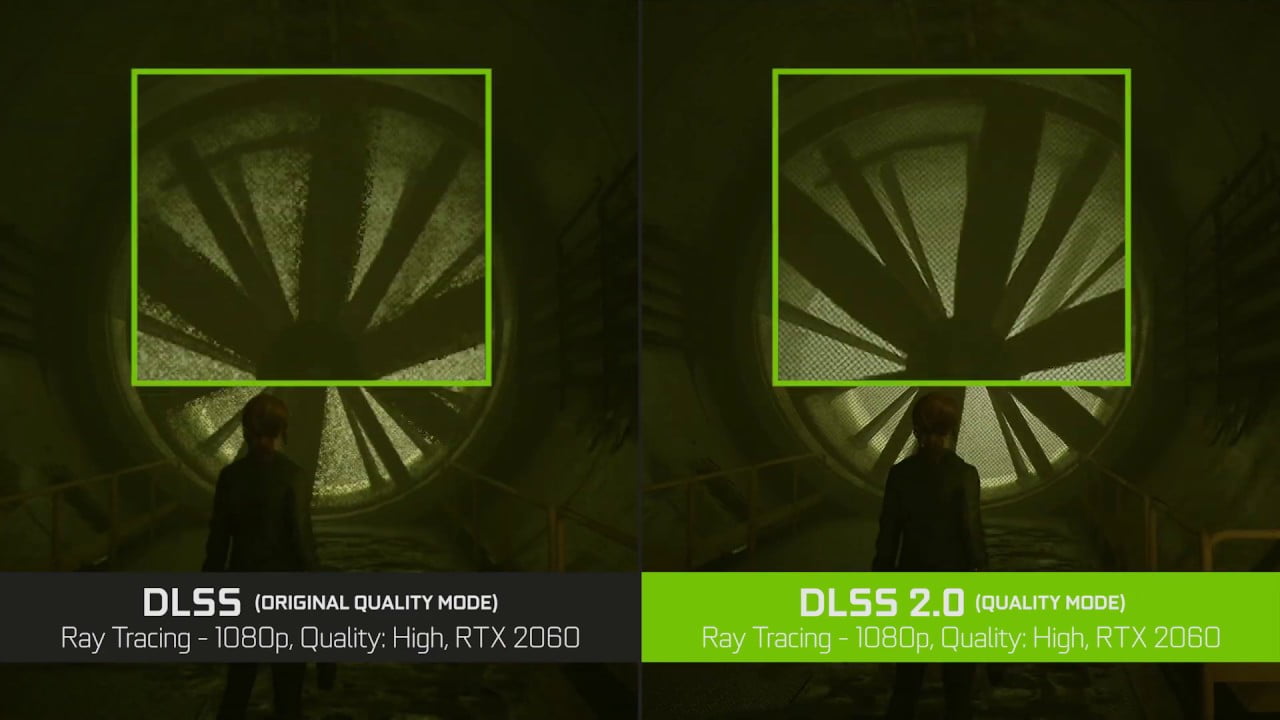
AI upscaling has fundamentally changed GPU performance math. NVIDIA’s DLSS 4 Multi Frame Generation, exclusive to RTX 50-series cards, generates up to three additional frames for every natively rendered frame. Combined with NVIDIA Reflex 2 for latency compensation, this technology pushes frame rates into territory that would require dramatically more expensive hardware to achieve natively. The catch: frame generation adds a small amount of input latency (mitigated but not eliminated by Reflex 2), and the feature only works in games that specifically support it.
AMD’s FSR 4 represents a major leap for Team Red. For the first time, FSR uses machine learning (on RDNA 4 hardware) rather than spatial upscaling algorithms, bringing quality closer to DLSS than any previous FSR version. FSR 3 frame generation remains available on older AMD and even NVIDIA hardware, though image quality varies significantly by game implementation.
Intel’s XeSS 2 is competent but trails both competitors in supported game count and visual quality. For Arc B580 buyers, it’s a nice bonus rather than a purchase justification.
Ray Tracing Performance Tiers
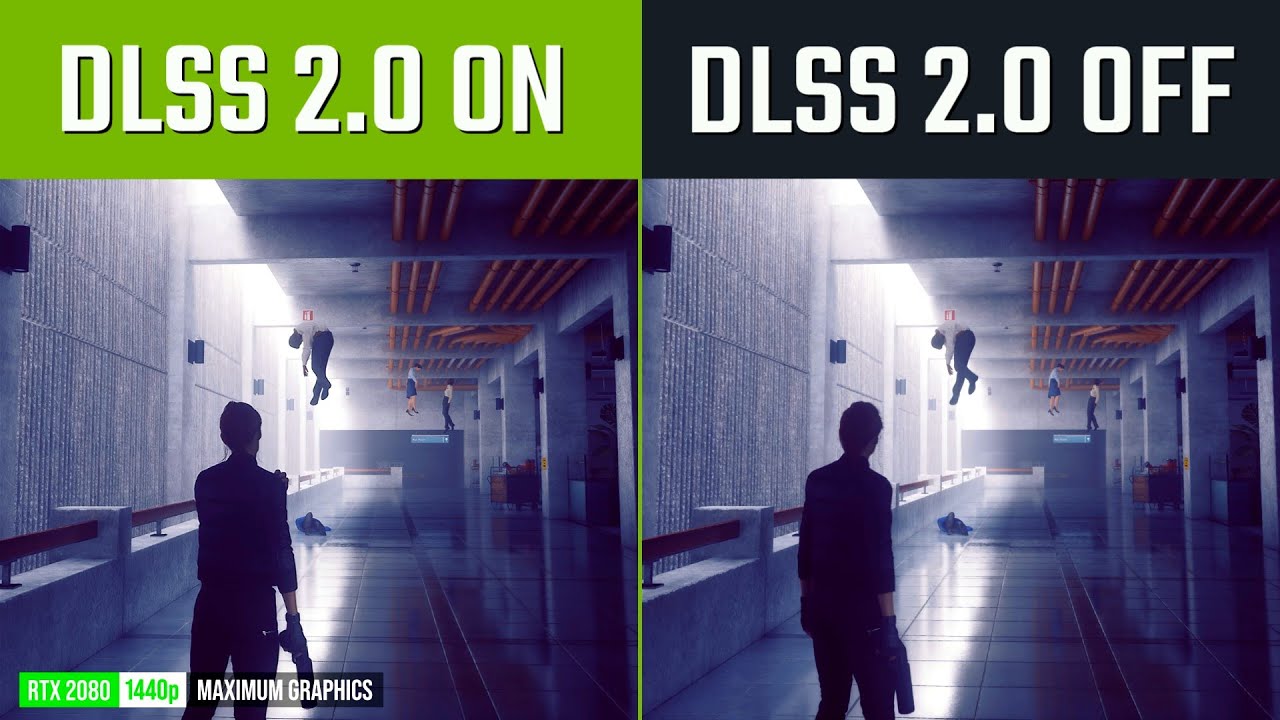
Ray tracing capability varies wildly across current GPUs. Full path tracing in games like Cyberpunk 2077 and Alan Wake 2 demands the absolute top tier of hardware. The RTX 5090 and RTX 5080 handle full path tracing at 4K with DLSS enabled. The RTX 5070 Ti and RTX 5070 manage heavy ray tracing at 1440p comfortably. AMD’s RDNA 4 improved RT performance roughly 2x over RDNA 3, putting the RX 9070 XT in playable territory for moderate ray tracing effects, though it still trails NVIDIA’s comparable offerings in pure RT workloads. The Intel Arc B580 handles basic RT effects at 1080p but shouldn’t be purchased primarily for ray tracing.
Power Consumption and Thermal Reality
GPU power consumption directly affects your electricity bill, case temperatures, and noise levels. The RTX 5090 draws 575W TDP and requires a robust 1000W+ power supply. The RTX 5080 is more reasonable at 360W. The efficiency champion of the current generation is the RTX 5070, which delivers extraordinary performance per watt at just 250W TDP. AMD’s RX 9070 XT draws 300W, and the Intel Arc B580 sips power at just 190W.
If you’re upgrading from an older system, check your power supply headroom before buying. A card that technically fits in your case but pushes your PSU to 95% capacity will run hot, trigger shutdowns under load, and potentially damage components. Budget $80-$150 for a quality PSU upgrade if your current unit doesn’t have adequate headroom.
1. ASUS TUF GeForce RTX 5080 OC Edition — Best High-End GPU
- Powered by the NVIDIA Blackwell architecture and DLSS 4
- Military-grade components deliver rock-solid power and longer lifespan for ultimate durability
- Protective PCB coating helps protect against short circuits caused by moisture, dust, or debris
- 3.6-slot design with massive fin array optimized for airflow from three Axial-tech fans
- Phase-change GPU thermal pad helps ensure optimal thermal performance and longevity, outlasting traditional thermal paste for graphics cards under heavy loads
| Details | Information |
|---|---|
| Price | $1,624.99 |
| Discount | – |
| Rating on Amazon | out of 5 stars – Out of reviews. |
| Brand | ASUS |
| Buy Now | Buy on Amazon |
The RTX 5080 occupies the sweet spot of the Blackwell lineup — delivering roughly 90% of the RTX 5090’s rasterization performance at half the price, with 16 GB of GDDR7 memory that handles 4K gaming comfortably. Where the 5090 is an indulgence, the 5080 is the practical choice for serious 4K gaming and content creation without remortgaging anything.
DLSS 4 Multi Frame Generation transforms this card’s 4K capability. In supported titles like Cyberpunk 2077, DLSS 4 with frame generation pushes frame rates from 60-70 FPS (native) to over 200 FPS with minimal perceptual latency thanks to Reflex 2. Even without frame generation, standard DLSS 4 Super Resolution delivers 80-120 FPS at 4K in the most demanding current games. Ray tracing performance is exceptional — this is genuinely capable of full path tracing at 1440p and heavy RT effects at 4K.
The ASUS TUF variant specifically earns the recommendation for its cooling solution. The triple-fan axial-tech design keeps temperatures in the low 70s during sustained gaming loads, and the military-grade components (including protective PCB coating) provide durability that justifies the “TUF” branding. The 3.6-slot form factor is thick but fits standard ATX cases. The 360W TDP is manageable with a quality 850W power supply.
The 16 GB GDDR7 buffer on a 256-bit bus provides adequate bandwidth for current 4K workloads, though it’s worth noting this is the same VRAM capacity as the RTX 5070 Ti at a significantly higher price. The premium buys you substantially more shader performance and RT capability, not more VRAM headroom.
Best for: 4K gaming at maximum settings, content creation, ray tracing enthusiasts who want top-tier performance without the 5090’s extreme price.
Buy ASUS TUF RTX 5080 on Amazon2. MSI GeForce RTX 5070 Ti Gaming Trio OC — Best 4K Value
- NVIDIA GEFORCE RTX 5070 Ti GPU - Blackwell advanced architecture with extreme 4th generation RTX ray tracing capabilities (QHD/1440p) and 16GB (28Gbps) GDDR7 memory); Supports DLSS 4.0 enhanced frame rate performance.
- MSI GAMING TRIO OC STYLE - The GAMING TRIO OC combines a factory overclocked GPU with great aesthetics. It is an optimal solution for seasoned gamers and creators looking for a high-performance graphics card with RGB.
- FROZR 4 TOP COOLING - STORMFORCE incorporates 7 textured blades, double ball bearings and ZERO FROZR (0 RPM mode). Nickel-plated copper base, heat pipes, Airflow Control radiator and thermal pads maximize heat dissipation.
- Careful design – The metal back plate reinforces the chassis and its perforated design helps reduce trapped heat; The PCB includes high power limit circuits and high-end electrical protectors.
- STURDY & POWERFUL - 2.5-slot card (PCIe 5.0 x16); Measures 338mm long and weighs 1310g; Recommended PSU power of 650W or more (16 pins, 250W power consumption); Rear ports include 3 x DisplayPort 2.1b and 1 x HDMI 2.1b B (4K / 480Hz)
| Details | Information |
|---|---|
| Price | $1,289.99 |
| Discount | – |
| Rating on Amazon | out of 5 stars – Out of reviews. |
| Brand | MSI |
| Buy Now | Buy on Amazon |
The RTX 5070 Ti is the GPU I’d recommend to most gamers targeting 4K without breaking the budget. At $749 MSRP, it slots between the RTX 5070 and RTX 5080 and delivers a compelling balance: 16 GB GDDR7 on a 256-bit bus provides the VRAM headroom that the 5070 lacks, while performance lands roughly 15-20% behind the 5080 in rasterization and closer in ray tracing. For the $250 price difference, that performance gap rarely translates to a meaningfully different gaming experience.
MSI’s Gaming Trio OC variant pushes the boost clock to extreme performance levels with the TRI FROZR 4 cooling system using three STORMFORCE fans. The card runs cool and quiet under load — critical for a GPU you’ll be gaming on for hours at a time. The PCIe 5.0 interface future-proofs the card for upcoming motherboard platforms, and DLSS 4 Multi Frame Generation is fully supported.
In practical gaming terms, the 5070 Ti delivers 80-100+ FPS at 4K with DLSS Quality in demanding titles like Black Myth: Wukong and Star Wars Outlaws. At 1440p, you’re looking at 120-165+ FPS in most games, saturating high-refresh monitors without breaking a sweat. This is the card that makes 4K/120Hz gaming accessible without requiring a flagship budget.
Best for: 4K gamers who want 16 GB VRAM and strong ray tracing without paying flagship prices. The rational high-end choice.
Buy MSI RTX 5070 Ti on Amazon3. ASUS TUF GeForce RTX 5070 OC Edition — Best 1440p GPU
- Powered by the NVIDIA Blackwell architecture and DLSS 4
- Military-grade components deliver rock-solid power and longer lifespan for ultimate durability
- Protective PCB coating helps protect against short circuits caused by moisture, dust, or debris
- 3.125-slot design with massive fin array optimized for airflow from three Axial-tech fans
- Phase-change GPU thermal pad helps ensure optimal thermal performance and longevity, outlasting traditional thermal paste for graphics cards under heavy loads
| Details | Information |
|---|---|
| Price | $754.42 |
| Discount | – 6% |
| Rating on Amazon | out of 5 stars – Out of reviews. |
| Brand | ASUS |
| Buy Now | Buy on Amazon |
NVIDIA made a bold claim at launch: the RTX 5070 delivers “RTX 4090-class performance” at $549. That claim requires significant asterisks — it’s true with DLSS 4 Multi Frame Generation enabled in supported games, but native rasterization performance sits closer to the RTX 4070 Ti SUPER. Nevertheless, this is an extraordinary amount of GPU for the money. The Blackwell architecture improvements in ray tracing, AI processing, and power efficiency make this the clear 1440p champion.
At 1440p, the RTX 5070 consistently delivers 100-144+ FPS in demanding AAA titles with DLSS Quality enabled. High-refresh 1440p monitors (165Hz, 240Hz) are well-served by this card. The 250W TDP is impressively efficient — this card runs cooler and quieter than the previous-generation RTX 4070 Ti while delivering equivalent or better performance. A quality 650W power supply handles it comfortably, making it an easier slot-in upgrade for existing builds.
The 12 GB GDDR7 on a 192-bit bus is the elephant in the room. At 1440p, 12 GB is currently sufficient for virtually every game at high or ultra settings. At 4K, some current titles already exceed 12 GB at maximum textures. If you’re buying this card exclusively for 1440p gaming and plan to upgrade within 2-3 years, the VRAM is fine. If you’re targeting 4K or want maximum longevity, the 5070 Ti’s 16 GB is worth the $200 premium.
Best for: 1440p high-refresh gaming, efficient builds, and buyers who want DLSS 4 Multi Frame Generation at the lowest possible price.
Buy ASUS TUF RTX 5070 on Amazon4. Sapphire Nitro+ AMD Radeon RX 9070 XT — Best AMD GPU
| Details | Information |
|---|---|
| Price | |
| Discount | – |
| Rating on Amazon | out of 5 stars – Out of reviews. |
| Brand | Sapphire |
| Buy Now | Buy on Amazon |
AMD’s RDNA 4 architecture made the RX 9070 XT the most competitive AMD GPU in years. At $549, it goes head-to-head with the RTX 5070 in rasterization and occasionally wins, while offering 16 GB of GDDR6 on a 256-bit bus — 4 GB more VRAM than NVIDIA’s similarly-priced offering. For gamers who prioritize raw frame output at native resolution without AI upscaling, the 9070 XT is the better value on paper.
FSR 4, AMD’s first machine-learning-based upscaler, runs exclusively on RDNA 4 hardware and represents a quantum leap over FSR 3. Image quality approaches DLSS 4 Super Resolution in supported titles, though the game support library is smaller. FSR 3 frame generation works broadly across the library and doesn’t require per-game implementation, providing a wider compatibility net. The tradeoff is that FSR 3 frame generation doesn’t match DLSS 4 Multi Frame Generation’s quality or its ability to generate three frames per rendered frame.
Ray tracing is where the gap remains. RDNA 4 doubled RT performance over RDNA 3, making moderate ray tracing effects playable at 1440p. But full path tracing remains NVIDIA’s domain — games like Cyberpunk 2077 Overdrive mode run 30-40% slower on the 9070 XT versus the RTX 5070 with comparable RT settings. If ray tracing is secondary to your priorities (and for many gamers it is), this card delivers exceptional traditional rasterization performance with more VRAM for future-proofing.
Sapphire’s Nitro+ cooler is consistently the best aftermarket AMD card available — quiet under load, cool running, and built with premium components. The 300W TDP needs a quality 750W PSU.
Best for: Gamers who prioritize VRAM headroom, native resolution performance, and value over ray tracing and DLSS 4. The best AMD GPU you can buy.
Buy Sapphire Nitro+ RX 9070 XT on Amazon5. MSI GeForce RTX 4070 Ti SUPER Gaming X Slim — Best Previous-Gen Value
- Chipset: GeForce RTX 4070 Ti Super
- Boost Clock / Memory: 2685 MHz / 21 Gbps
- Video Memory: 16GB GDDR6X
- Memory Interface: 256-bit
- Output: DisplayPort x 3 (v1.4a) / HDMI x 1 (2.1a)
| Details | Information |
|---|---|
| Price | |
| Discount | – |
| Rating on Amazon | out of 5 stars – Out of reviews. |
| Brand | MSI |
| Buy Now | Buy on Amazon |
The RTX 4070 Ti SUPER is the best GPU deal in the market right now for one reason: retailers are clearing Ada Lovelace inventory at aggressive discounts. Street prices have dropped below $600 in many markets, putting a 16 GB card with strong 4K capability at prices that undercut the RTX 5070. You lose DLSS 4 Multi Frame Generation (DLSS 3 single-frame generation still works), but you gain 4 GB more VRAM than the RTX 5070 at a lower price.
Rasterization performance sits between the RTX 5070 and RTX 5070 Ti. At 4K, the 4070 Ti SUPER delivers 60-80 FPS in demanding games with DLSS Quality, which is perfectly playable. At 1440p, you’re consistently above 100 FPS in virtually everything. The 16 GB GDDR6X buffer handles 4K textures comfortably today and provides headroom for the next wave of titles. Ray tracing performance is strong — the RTX 40-series RT cores were already excellent, and DLSS 3 frame generation provides a meaningful FPS boost in supported titles.
MSI’s Gaming X Slim design is notably compact for a high-performance GPU — fitting in cases that can’t accommodate the thick triple-slot designs of competitor models. The dual-fan FROZR cooling system is efficient enough to keep the card quiet during extended gaming sessions despite the smaller form factor. Ada Lovelace’s power efficiency is excellent, with a 285W TDP that many existing 750W power supplies handle without an upgrade.
Best for: Budget-conscious 4K gamers, anyone upgrading from RTX 30-series or older who wants immediate value over cutting-edge features, and builders with compact cases.
Buy MSI RTX 4070 Ti SUPER on Amazon6. Sapphire Nitro+ Radeon RX 7900 XTX Vapor-X — Best AMD High-End
- Boost Clock: Up to 2680 MHz
- Game Clock: Up to 2510 MHz
- Memory Size/Bus: 24GB/384 bit DDR6; Memory Clock: 20 Gbps Effective
- Output: 2 x HDMI, 2 x DisplayPort
- Form Factor: 3.5 slot, ATX; Dimension: 320(L) X 135.75(W) X 71.6(H) mm
| Details | Information |
|---|---|
| Price | $1,745.00 |
| Discount | – |
| Rating on Amazon | out of 5 stars – Out of reviews. |
| Brand | Sapphire |
| Buy Now | Buy on Amazon |
The RX 7900 XTX remains AMD’s fastest GPU since the company skipped a flagship RDNA 4 card. With 24 GB GDDR6 on a 384-bit bus, this card has more VRAM than anything else on this list except the RTX 5090. For raw 4K rasterization performance without AI upscaling, the 7900 XTX trades blows with the RTX 4080 SUPER and edges ahead in games that leverage AMD’s wider memory bus and larger buffer. Content creators working with large video files, 3D rendering projects, or machine learning workloads benefit directly from the 24 GB capacity.
The Vapor-X variant from Sapphire is the definitive version — a massive triple-fan cooler with a vapor chamber that keeps the GPU core well below throttling temperatures even during extended 4K gaming sessions. The replaceable fan system (single screw per fan) is a practical touch that extends the card’s practical lifespan. Build quality is premium throughout, with a reinforced backplate and robust power delivery.
The card’s limitations are generational. RDNA 3 ray tracing is functional but noticeably behind NVIDIA’s current implementation. FSR 3 spatial upscaling doesn’t match DLSS quality, and FSR 4’s machine learning mode requires RDNA 4 hardware. The 7900 XTX is a rasterization monster with an extraordinary VRAM buffer, but it can’t match the RTX 5080 or even the RTX 5070 Ti in RT-heavy workloads. If ray tracing isn’t a priority and you value enormous VRAM, this card is a legitimate 4K contender at an increasingly attractive price point.
Best for: 4K rasterization, content creation, large VRAM workloads, and AMD loyalists who want the most powerful RDNA 3 GPU available.
Buy Sapphire RX 7900 XTX on Amazon7. Intel Arc B580 Limited Edition — Best Budget GPU
- The Complete Gaming Experience: Game at high resolutions with high frame rates and high image fidelity with Intel XeSS AI-enhanced upscaling technology and full support for ray tracing.
- A Versatile Creator Toolkit: The advanced Xe Media Engine handles high throughput creation easily in up to 8K resolution, plus support for all the most popular media codecs for varied content creation
- Engineered to Accelerate AI : Powerful XMX AI Engines unlock cutting edge AI experiences including upscaled gaming and next gen creation. Experiment with next-gen AI creation such as editing effects and text to image applications - all easily accessible through Intel AI Playground
| Details | Information |
|---|---|
| Price | $398.50 |
| Discount | – |
| Rating on Amazon | out of 5 stars – Out of reviews. |
| Brand | Intel |
| Buy Now | Buy on Amazon |
Intel’s second-generation Arc GPU proved that the company is serious about discrete graphics. The Arc B580 delivers performance competitive with the RTX 4060 and RX 7600 XT while costing $50-$80 less than either. At 1080p, this card handles every current game at high or ultra settings with frame rates consistently above 60 FPS. At 1440p, it’s playable in most titles at medium-to-high settings — impressive for a card under $250.
The 12 GB GDDR6 buffer is the headline spec. At this price point, NVIDIA offers 8 GB (RTX 4060) and AMD offers 8 GB (RX 7600). Intel gives you 50% more VRAM, which translates to better performance in texture-heavy modern games and meaningfully more longevity. This isn’t a marketing gimmick — in side-by-side testing, the B580’s 12 GB prevents the texture degradation and stuttering that 8 GB cards exhibit in games like Alan Wake 2 and Star Wars Outlaws at 1080p ultra.
Driver maturity was Intel Arc’s weakness at launch, and it’s improved substantially. Battlemage drivers are stable, game compatibility is broad, and performance has gained 5-15% through optimization patches since launch. XeSS 2 provides useful upscaling in supported titles. Basic ray tracing works at 1080p, though it’s not a reason to buy this card. The 190W TDP makes this the most power-efficient GPU on this list relative to its performance tier.
Best for: 1080p gaming on a budget, entry-level 1440p, first PC builds, and anyone who wants 12 GB VRAM for under $250.
Buy Intel Arc B580 on Amazon8. MSI GeForce RTX 5090 SUPRIM SOC — Best Enthusiast GPU (No Compromises)
- Chipset: NVIDIA GeForce RTX 5090
- Video Memory: 32 GB GDDR7
- Memory Interface: 512-bit
- Output: DisplayPort x 3 (v2.1a) / HDMI 2.1b x 1
- Digital maximum resolution: 7680 x 4320
| Details | Information |
|---|---|
| Price | $4,209.99 |
| Discount | – |
| Rating on Amazon | out of 5 stars – Out of reviews. |
| Brand | MSI |
| Buy Now | Buy on Amazon |
The RTX 5090 is the fastest consumer GPU ever built, and the MSI SUPRIM SOC pushes it to its absolute limits. With 32 GB GDDR7 on a 512-bit bus, 21,760 CUDA cores, and a boost clock of 2580 MHz, this card treats 4K/120Hz gaming like a minimum target rather than an aspiration. Full path tracing at 4K with DLSS 4 is genuinely smooth. 8K gaming becomes plausible with aggressive upscaling. For 3D rendering, AI model training, and video production, the 32 GB buffer and Blackwell’s compute improvements make this a workstation-class card in gaming hardware clothing.
The SUPRIM SOC is MSI’s highest-tier overclock, pushing boost clocks above reference and pairing them with a massive cooling solution that keeps temperatures manageable despite the 575W TDP. You’ll need a 1000W+ power supply, a full-tower case, and adequate airflow. This is not a compact build card. The 12VHPWR connector and physical dimensions demand planning before purchase.
At roughly $2,000+ for aftermarket models (MSI SUPRIM SOC often exceeds $4,000), this GPU makes financial sense only for enthusiasts who demand the absolute best, professionals who need 32 GB VRAM for production workloads, or competitive gamers targeting the highest possible frame rates at maximum quality. For everyone else, the RTX 5080 delivers 90% of this card’s gaming experience at less than half the cost. But for those who won’t compromise — this is it. Nothing faster exists.
Best for: No-compromise 4K/8K gaming, professional 3D rendering, AI/ML workloads, and enthusiasts who want the fastest GPU money can buy.
Buy MSI RTX 5090 SUPRIM SOC on AmazonGPU Pricing Reality Check: What to Expect in 2026
The GPU market in 2026 has a clear pattern: the top end is expensive, and the mid-range is where the real value lives. Here’s a realistic look at what you’re actually paying versus MSRP:
| GPU | MSRP | Typical Street Price | VRAM | Target Resolution |
|---|---|---|---|---|
| RTX 5090 | $1,999 | $2,200-$4,200+ | 32 GB GDDR7 | 4K/8K |
| RTX 5080 | $999 | $1,050-$1,300 | 16 GB GDDR7 | 4K |
| RTX 5070 Ti | $749 | $780-$950 | 16 GB GDDR7 | 4K/1440p |
| RX 9070 XT | $549 | $549-$650 | 16 GB GDDR6 | 4K/1440p |
| RTX 5070 | $549 | $570-$700 | 12 GB GDDR7 | 1440p |
| RTX 4070 Ti SUPER | $799 | $550-$650 (clearance) | 16 GB GDDR6X | 4K/1440p |
| RX 7900 XTX | $999 | $800-$900 | 24 GB GDDR6 | 4K |
| Intel Arc B580 | $249 | $229-$260 | 12 GB GDDR6 | 1080p/1440p |
The standout value shifts happen with previous-generation clearance pricing. When you can find an RTX 4070 Ti SUPER for $550-$600 — below the RTX 5070’s MSRP — it becomes the objectively better value: same or better rasterization, 16 GB versus 12 GB VRAM, and the only thing you miss is DLSS 4 Multi Frame Generation (DLSS 3 still works). AMD’s RX 9070 XT also tends to be available closer to MSRP than NVIDIA’s latest cards, making it the more predictable purchase.
How to Choose the Right GPU for Your Setup
| Your Situation | Best Pick | Why |
|---|---|---|
| 4K max settings, ray tracing | RTX 5080 | 90% of RTX 5090 performance at half the price |
| 4K gaming, value focused | RTX 5070 Ti | 16 GB VRAM, strong 4K, $749 |
| 1440p high-refresh | RTX 5070 | DLSS 4, 100-165+ FPS at 1440p, efficient |
| Best AMD performance | RX 9070 XT | 16 GB, FSR 4, competitive rasterization |
| Discounted previous-gen | RTX 4070 Ti SUPER | 16 GB, 4K capable, below $600 on clearance |
| Maximum VRAM, content creation | RX 7900 XTX | 24 GB, raw rasterization power |
| Budget 1080p gaming | Intel Arc B580 | 12 GB VRAM for under $250 |
| Money is no object | RTX 5090 | Fastest GPU ever made, 32 GB GDDR7 |
GPU Bottleneck: Matching Your GPU to Your CPU
A GPU is only as fast as the CPU feeding it data. Pairing a $1,000 GPU with a budget CPU creates a bottleneck where the GPU sits idle waiting for the processor to prepare frames. As a general rule:
The RTX 5090 and RTX 5080 demand a high-end CPU — Intel Core i7-14700K / AMD Ryzen 7 9800X3D or better. The RTX 5070 Ti and RTX 5070 pair well with mid-range chips like the Intel Core i5-14600K or AMD Ryzen 5 9600X. The RX 9070 XT and RTX 4070 Ti SUPER work efficiently with the same mid-range processors. The Intel Arc B580 is happy with any recent gaming CPU, including budget options like the Intel Core i5-13400 or AMD Ryzen 5 7600.
At 1080p, CPU bottlenecks are more pronounced because the GPU finishes frames faster and waits for the CPU more frequently. At 4K, the GPU does more work per frame, reducing CPU dependency. If you’re gaming primarily at 4K, you can pair a slightly less powerful CPU with a high-end GPU and see minimal performance loss. At 1080p with a high-refresh monitor, CPU choice matters more than GPU choice above a certain performance tier.
The VRAM Dilemma: How Much Do You Actually Need?
VRAM debates generate more heat than a reference RTX 5090, so here’s the practical breakdown based on actual game testing data from TechPowerUp’s RTX 5070 review and independent benchmarks:
8 GB (RTX 4060, RX 7600): Already a limiting factor at 1440p in several 2025-2026 titles. Playable at 1080p with some texture quality compromises. Not recommended for new purchases unless budget is the absolute priority.
12 GB (RTX 5070, Arc B580): Comfortable at 1080p and 1440p for current and near-future titles. Tight at 4K in the most demanding games (Alan Wake 2 exceeds 12 GB at 4K ultra). Adequate for most buyers who plan to upgrade within 2-3 years.
16 GB (RTX 5070 Ti, RTX 5080, RX 9070 XT, RTX 4070 Ti SUPER): The sweet spot. Handles 4K gaming comfortably in current titles with headroom for future releases. This is the VRAM amount I’d recommend for any GPU purchase intended to last 3-5 years.
24-32 GB (RX 7900 XTX, RTX 5090): Overkill for pure gaming today, but valuable for content creation, 3D rendering, AI workloads, and extreme future-proofing. If you’re working with large Blender scenes, DaVinci Resolve timelines, or training ML models alongside gaming, this capacity pays for itself.
Final Thoughts
The GPU market in 2026 offers something genuinely good at every price point, which hasn’t been true for most of the past decade. Intel’s $249 Arc B580 delivers a better 1080p experience than $300+ GPUs from two years ago. AMD’s RX 9070 XT competes with NVIDIA at $549 while offering more VRAM. Previous-generation clearance deals put the RTX 4070 Ti SUPER — a card that handles 4K gaming — in the $550-$600 range. And at the top, NVIDIA’s Blackwell architecture with DLSS 4 Multi Frame Generation redefines what’s possible with AI-assisted rendering.
My honest advice: buy for the resolution you play at today, with enough VRAM to last through the next GPU generation. At 1080p, the Arc B580 is an outstanding value. At 1440p, the RTX 5070 or RX 9070 XT covers you. At 4K, the RTX 5070 Ti hits the value sweet spot with 16 GB GDDR7 and full DLSS 4 support. Everything above that is paying for performance you want rather than performance you need — and there’s nothing wrong with that if the budget allows. Just don’t buy 8 GB of VRAM in 2026. You’ll regret it before the warranty expires.





Share Your Thoughts